Introduction: The Legend of Tuco, Our AI Super-Intern
Imagine your company hired a super-intern. His given name was “AI Agent for Utility, Corporate and Operational Tasks”, but the team, finding the name a bit… robotic, decided to fondly nickname him Tuco. Legend has it the nickname stuck the day he tried to be proactive and nearly formatted the CEO’s laptop after misunderstanding a request to “clean up the files”. It was a scare, but it showed that, brilliant as he was, Tuco needed clear limits.
He’s an incredibly intelligent Artificial Intelligence, able to understand your requests, plan tasks and help with practically anything. You, as the boss, ask for something that seems simple: “Tuco, please process the refund for customer Joana’s last order and send her a confirmation email”.
Tuco, ever helpful, scratches his silicon head and replies: “Sure thing, boss! But… how do I do that? Where do I look up orders? What’s the refund procedure? And how do I get into the email system? I don’t have a password for anything!”.
That’s the dilemma AIs faced for a long time. They were like a brilliant intern locked in a room, full of potential but with no access to the company’s tools and information. Every time a developer wanted the AI to do something new, they had to build a custom, fragile code “bridge” for each system. If the email system changed, the bridge broke. If the order system was updated, there went another bridge. It was a maintenance nightmare.
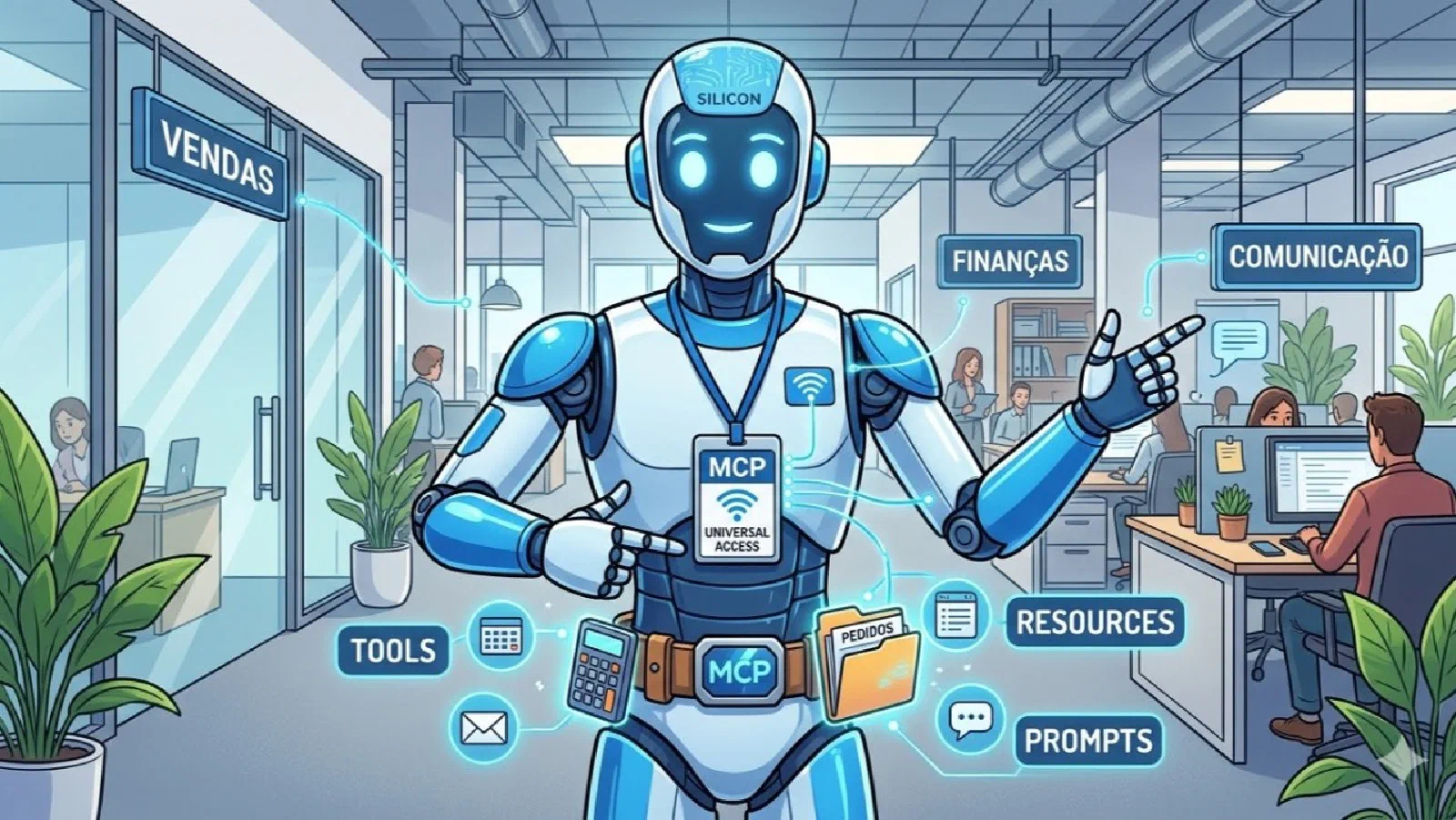
The Model Context Protocol (MCP), created by Anthropic and opened up to the community (open source), was born to solve exactly this problem. Simply put, MCP is like a universal access badge for our intern Tuco. Instead of building dozens of bridges, we give him a single badge that every department in the company understands. With that badge, Tuco can go to Sales, Finance or Communications and know exactly how to interact with each one in a standardized, secure way.
Tuco’s Utility Belt: Tools, Resources and Prompts
The MCP badge isn’t magic; it works because it defines a common language. When Tuco arrives at a department (an “MCP server”), he knows he can find three kinds of things on his “utility belt”:
- Tools: These are the actions Tuco can perform. Think of them as each department’s specialized equipment. Finance has a “Refund Calculator” (a processar_reembolso tool). Communications has an “Email Sender” (an enviar_email tool). Tuco doesn’t need to know the details of how the calculator works, only that he can use it to process a refund.
- Resources: These are the information Tuco can look up. They’re like each area’s files and documents. Sales has a “Customer Orders” file (a pedidos_cliente resource). Marketing has a “Product Catalog”. Tuco can use his badge to read these files and get the context he needs to do his tasks.
- Prompts (Fill-in Templates): These are like the company’s standard forms. To ask for something, Tuco has to fill out the right form. A prompt is a template that tells Tuco exactly how to format his requests so the LLM (the AI’s brain) understands and processes the information the right way. It’s a guide for how to “talk” to the brain.
With this utility belt, Tuco’s job becomes much easier. For Joana’s refund, he uses his badge to:
- Go to Sales and use the “Customer Orders” Resource to find Joana’s last order.
- Go to Finance and use the “Refund Calculator” Tool to process the amount.
- Go to Communications and use the “Email Sender” Tool to send the confirmation.
All of it standardized, secure and without fragile code bridges. If the email system changes, Communications updates its tool, but Tuco’s badge keeps working the same way.
The Badge Office: How Tools Like Copilot Studio Handle MCP
Creating a universal badge and a utility belt for Tuco sounds great, but who manages all of this? That’s where AI development platforms like Microsoft Copilot Studio come in.
Think of Copilot Studio as the company’s Badge Office. Instead of every developer having to create each badge (MCP server) and each connection by hand, these platforms do the heavy lifting. They offer a simplified visual interface where developers can:
- Connect to Data Sources with One Click: The platform already has prebuilt connectors for hundreds of systems (like SAP, Salesforce or any database). When you connect a source, the platform automatically creates an “MCP server” for it, exposing the available tools and resources.
- Manage Permissions Centrally: The Badge Office lets administrators define exactly what Tuco can and can’t do. He can use the consultar_pedidos tool, but not deletar_clientes, for example. This ensures security and governance across the company.
- Update Everything Automatically: When Sales adds a new tool to its system, the Badge Office detects the change and automatically updates Tuco’s utility belt. He’ll always have access to the latest versions of the tools, without anyone having to step in manually.
Other tools, such as Langflow and n8n, are also adopting MCP, letting developers build and orchestrate these AI workflows visually and in a standardized way. They work as alternative badge offices, each with its own specialties, but all speaking the same MCP language.
Conclusion: Giving the Intern Superpowers (and a Badge)
The Model Context Protocol (MCP) is more than just a technical standard; it’s a fundamental shift in how we build and manage AI applications. It turns our AI agents, like Tuco, from brilliant but isolated interns into productive, integrated members of the team.
By providing a “universal badge”, MCP removes the complexity of custom integrations, letting AIs access tools and data securely and at scale. And with platforms like Copilot Studio acting as the “Badge Office”, equipping our agents with the superpowers they need becomes accessible to every developer, not just AI specialists.
The future of AI won’t be built only with more powerful brains, but with better-organized ecosystems. And in that organization, the universal MCP badge is the key piece that will let our “Tucos” work with autonomy, security and, above all, an efficiency that used to be impossible.
References
Model Context Protocol - Official Documentation
Introducing Model Context Protocol (MCP) in Copilot Studio - Microsoft Copilot Blog