
Imagine having access to the British Library (the largest library in the world, with more than 200 million items) but dedicated exclusively to your company’s documents. Now imagine that this library has a super-smart librarian who never sleeps, understands the context of your questions and finds exactly what you need in seconds, connecting information in ways you never imagined possible.
That’s Azure AI Search.
Just as the British Library takes in 8,000 new titles a day and organizes them so anyone can find any piece of information, Azure AI Search turns the chaos of corporate documents into an intelligent search system that revolutionizes the way your company accesses and uses knowledge.
Your Company’s Digital British Library
Microsoft Azure AI Search, formerly known as Azure Cognitive Search, is much more than a simple search engine. It’s like building your own digital version of the British Library, but with artificial intelligence superpowers.
Why the Comparison with the British Library?
The British Library, located in London, isn’t the largest library in the world by accident. It represents the state of the art in organizing, cataloging and providing access to human knowledge [1]. With more than 200 million items, including books, manuscripts, maps, newspapers, magazines, sound recordings and much more, it shows how massive amounts of information can be organized so that anyone can find exactly what they’re looking for.
Azure AI Search does exactly that with your company’s data, but with the speed and intelligence only modern technology can offer.
The Traditional Librarian vs. the AI Librarian
At the British Library, you’d find specialized librarians who know the collection inside out and can help you find relevant information. Azure AI Search is like having a librarian who combines the knowledge of all those specialists, but with superhuman abilities:
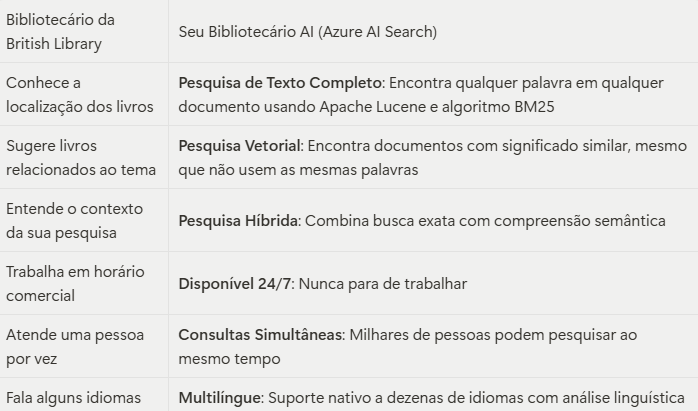
Your AI Librarian’s Superpowers
AI Enrichment: Imagine if the British Library’s librarian could not only find a document, but also:
- Read documents in any language and translate them instantly
- Extract text from images and scanned documents (OCR)
- Create automatic summaries of long documents
- Identify people, places and important concepts automatically
- Connect related information across different documents
That’s exactly what Azure AI Search’s AI skillset does during the indexing process.
The Different “Floors” of Your Library
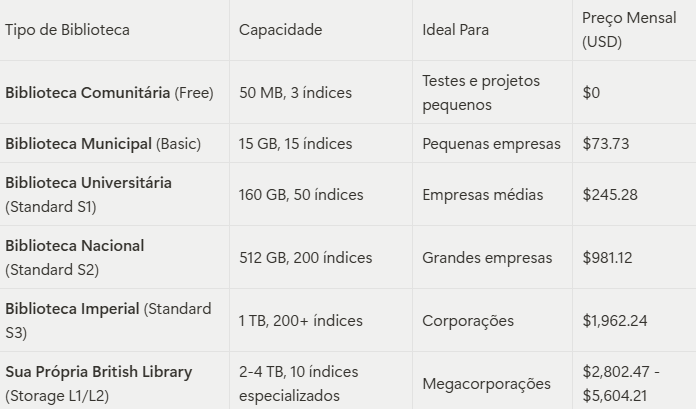
Just as the British Library has different sections for different kinds of collections and readers, Azure AI Search offers different “floors” (tiers) for different business needs:
The Universal Collection: Supported Formats
Just as the British Library accepts practically any kind of written or recorded material, Azure AI Search can process an impressive variety of formats [2]:
Classic Documents
- PDF: Like the British Library’s digitized books
- Microsoft Office: DOCX, XLSX, PPTX (like modern documents)
- Plain Text: TXT, RTF (like old manuscripts)
Periodicals
- HTML: Like online newspapers
- XML: Like structured catalogs
- CSV: Like tabular records
Correspondence
- EML, MSG: Like the historical letters preserved in the library
Special Materials
- KML: Like historical geographic maps
- ZIP: Like archived collections
- JSON: Like modern digital catalogs
Important Note: Just as the British Library converts different formats into a universal cataloging system, Azure AI Search converts all these formats to JSON during indexing, creating a unified search system.
How to Build Your Digital Library
Prerequisites: Preparing the Ground
Before building your digital British Library, you’ll need:
- An Azure account: Like having a plot of land to build on
- Azure CLI: Like having the construction tools
- The right permissions: the Search Service Contributor and Search Index Data Contributor roles
The Construction Process: From Foundation to Operation
1. Laying the Foundation (Creating the Service)
Like choosing the location and size of your library, you’ll create your Azure AI Search service in the Azure portal, selecting the tier that fits your needs.
2. Installing the Security System (Configuring Authentication)
Just as the British Library has sophisticated security systems, it’s recommended to use Microsoft Entra ID for keyless authentication, which offers more security than traditional API keys.
3. Designing the Shelves (Creating Indexes)
Like an architect planning the sections of the library, you’ll define your index schema, specifying which “fields” (types of information) each document will have. For modern AI applications, consider including vector fields for embeddings.
4. Setting Up the Cataloging System (Parsing Mode)
For RAG (Retrieval-Augmented Generation) applications, the Default parsing mode is recommended, since it automatically detects the file type and uses the right parser: like having a librarian who automatically recognizes whether they’re dealing with a book, a magazine or a manuscript.
5. Stocking the Library (Loading Documents)
Like carrying books to the shelves, you’ll populate your index using automatic indexers (which pull documents from sources such as Azure Blob Storage) or APIs for manual upload.
6. Opening to the Public (Running Queries)
Like opening the library doors, you’ll use the available REST APIs or SDKs (.NET, Python, Java, JavaScript) so applications and users can query your digital library.
The Different Types of Queries in Your Library
1. Catalog Lookup (Full-Text Search)
Like looking up a specific book in the British Library catalog by title or author. Azure AI Search uses Apache Lucene and the BM25 algorithm to find documents containing exactly the words you’re looking for.
Example: “Find all documents that mention ‘digital marketing strategy’”
2. Thematic Query (Vector Search)
Like asking the librarian: “I want something like this book, but I don’t know exactly what.” Azure AI Search uses vector embeddings to find semantically similar documents.
Example: You show a document about “digital transformation” and the system finds documents about “technological innovation”, “process modernization” and “business digitalization”.
3. Expert Query (Hybrid Search)
Like combining the precision of the catalog with the intuition of an expert librarian. Azure AI Search combines full-text search with vector search for more relevant and comprehensive results.
4. Academic Research Query (Multimodal Search)
Like searching not only books but also maps, images, recordings and other kinds of material. Azure AI Search can search across different types of content at the same time.
5. Advisory Query (Agentic Search/RAG)
Like having a personal assistant who not only finds information but organizes it and presents it in context to answer your specific questions. Ideal for chatbots and AI agents.
Investment: How Much Does Your Digital British Library Cost?
Cost Comparison
Consider that running the real British Library costs millions of pounds a year and serves millions of people. Your digital British Library:
- Free Tier: Like a community library, perfect for getting started
- Basic Tier ($73.73/month): Like a well-equipped public library
- Standard Tiers ($245-$1,962/month): Like prestigious university libraries
- Storage Optimized Tiers ($2,802-$5,604/month): Like having your very own British Library
Conclusion: Your Knowledge Revolution
The British Library transformed access to human knowledge over the centuries. Azure AI Search does the same for your company’s knowledge, but on a much shorter timescale and with capabilities the British Library’s founders never dreamed of.
With more than 200 million items, the British Library proves that massive amounts of information can be organized in an accessible way. Azure AI Search proves that it can be done with artificial intelligence, instant speed and contextual understanding.
This isn’t just about technology. It’s about democratizing access to knowledge within your organization, just as the British Library democratized access to the world’s knowledge.
References
[1] Introduction to Azure AI Search - Azure AI Search | Microsoft Learn
[2] Supported document formats - Azure AI Search | Microsoft Learn
[3] Quickstart: Full-Text Search - Azure AI Search | Microsoft Learn