
For years, data engineers have been building pipelines that connect Azure Data Factory (ADF) to Databricks, a powerful combination that often required manual tweaks and complex configuration. It was like having a DeLorean that needed constant recalibration of the flux capacitor before every trip through time: functional, but far from ideal.
Microsoft has just announced an update that promises to revolutionize this integration: the new Databricks Job activity in ADF. This feature lets you orchestrate any type of Databricks job directly from Data Factory, eliminating the need for workarounds and dramatically simplifying the data architecture. It’s as if Doc Brown had finally perfected the DeLorean, allowing direct trips to any point in time with a single click.
For data professionals, this update is much more than a simple technical convenience. It brings the potential for significant cost reduction, simpler architectures, and a smoother development experience. Modern “time travelers” can now focus more on data quality and less on the complexities of cross-platform integration.
What Changed? The New DeLorean - The Evolution of the ADF-Databricks Integration
Before this update, integrating ADF and Databricks was possible, but limited. The available options included:
- Notebook Activity: Run individual notebooks, but without access to all of Databricks’ features
- REST API calls: Implement custom code to trigger jobs, requiring constant maintenance
- Hybrid solutions: Combine different approaches, increasing complexity
It was like driving a DeLorean built from improvised parts: it worked, but it needed constant attention and adjustment.
The new Databricks Job activity completely changes that reality. Now you can:
- Orchestrate any type of Databricks job directly from ADF
- Run complete workflows with multiple tasks in sequence
- Take advantage of serverless compute for cost optimization
- Parameterize jobs for maximum flexibility
- Monitor runs directly in the ADF interface
What Can You Run?
Doc Brown would be impressed by the versatility of this new DeLorean. The Databricks Job activity supports practically any operation available in Databricks:
- Notebooks: Run Python, Scala, R, or SQL code
- SQL Tasks: Direct SQL queries and transformations
- Delta Live Tables: Declarative pipelines for data processing
- Model Serving: Batch inference using model endpoints
- Power BI: Automatic publishing and refresh of semantic models
This means you can build end-to-end pipelines that span everything from raw data ingestion to refreshing BI dashboards, all orchestrated from a single platform.
Why Does This Matter? Time Travel Without Paradoxes - Eliminating Temporal Paradoxes
In the “Back to the Future” trilogy, temporal paradoxes were a constant risk that complicated every trip. In the same way, the traditional integration between ADF and Databricks created its own “paradoxes”:
- The Startup Paradox: Clusters that took a long time to start between activities
- The Visibility Paradox: Monitoring fragmented across platforms
- The Maintenance Paradox: Custom code that required constant updating
The new Job activity resolves these paradoxes, creating a cleaner, more efficient timeline for your data.
Strategic Impact
This update isn’t just a technical improvement, it’s a strategic shift that affects different aspects of data engineering:
- Unifying the Azure Ecosystem: Strengthens cohesion between Microsoft services
- Architectural Simplification: Reduces complexity and the need for specialized knowledge
- Democratizing Advanced Features: Makes advanced features accessible through a visual interface
For different professional profiles, the benefits are clear:
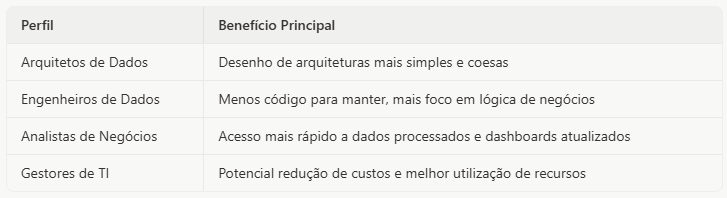
_Benefits by Profile_
Saving “Plutonium” - The Fuel of Pipelines
In the “Back to the Future” universe, plutonium was the expensive, hard-to-get fuel that powered the original DeLorean. In the modern version, Doc Brown managed to replace it with a fusion reactor powered by ordinary garbage: a far more efficient and economical solution.
Similarly, the new Databricks Job activity lets you replace the “expensive fuel” (dedicated clusters and custom code) with a more efficient alternative (serverless compute and native orchestration).
Comparative Scenario
To show the financial impact of this change, we simulated a common scenario at mid-sized companies:
- Daily processing of 50GB of data
- A pipeline with 4 stages: ingestion, transformation, aggregation, and loading
- Daily run with a 4-hour processing window
- Azure environment in the East US region
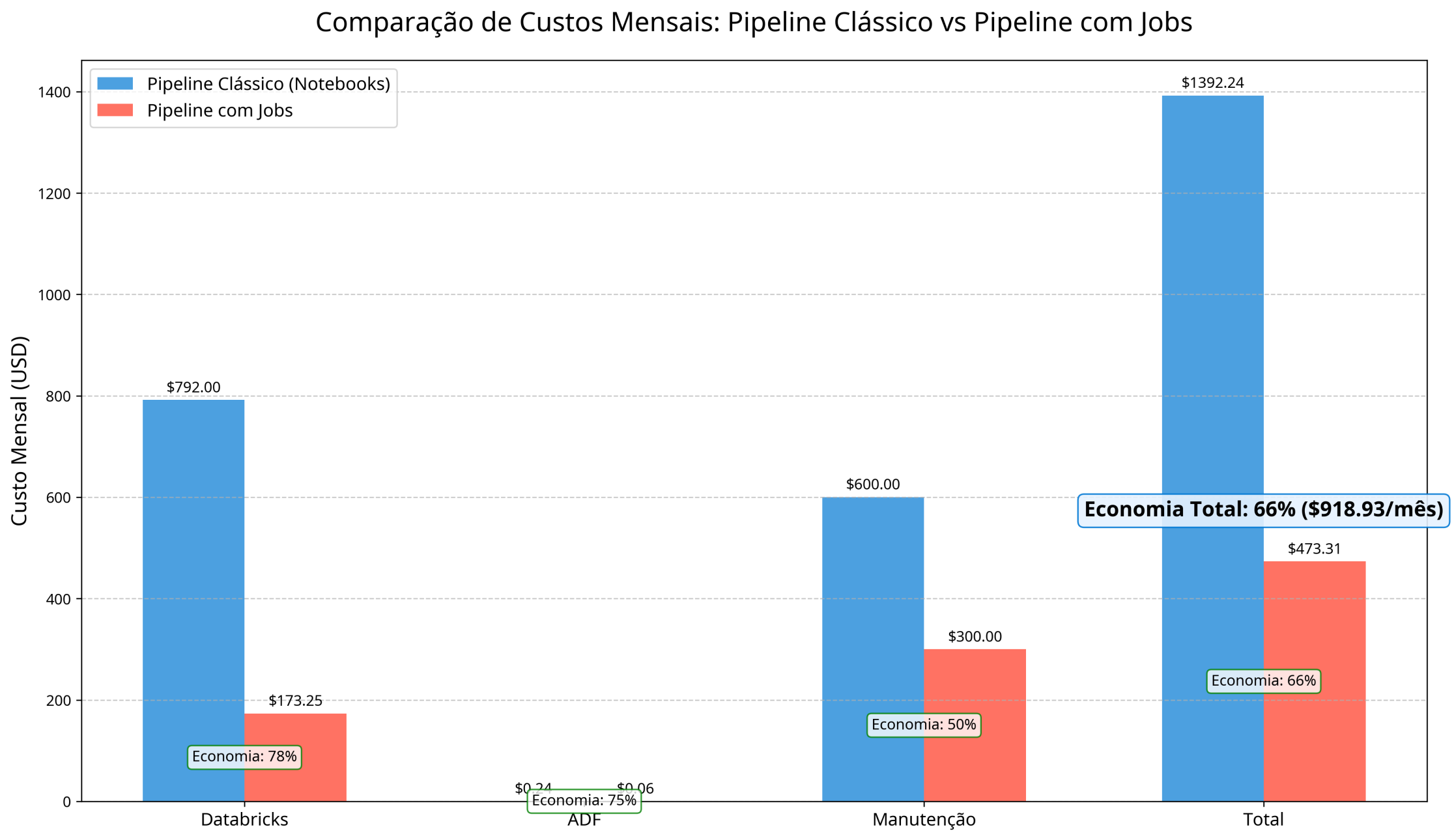
The simulation reveals surprising savings:
- Classic Pipeline: $1,392.24 per month
- Pipeline with Jobs: $473.31 per month
- Absolute Savings: $918.93 per month
- Percentage Savings: 66%
Factors That Contribute to the Savings
- Serverless Compute: You pay only for actual processing time
- Optimized Startup: Less overhead between tasks in the same job
- Reduced Maintenance: A simpler interface and less code to maintain
- Simplified Orchestration: Fewer activities in ADF
It’s as if the DeLorean had gone from a plutonium engine to solar cells: more efficient, cheaper, and better for the environment (or, in this case, for the IT budget).
Building Your First Time Machine - A Practical Guide
Setting Up the Integration
Let’s get to Doc Brown’s simplified manual for building your own data DeLorean. Setting up the new Databricks Job activity is surprisingly simple:
- In Azure Data Factory Studio:
- Create a new pipeline or edit an existing one
- In the activities pane, find the Databricks section
- Drag the “Job” activity onto the canvas
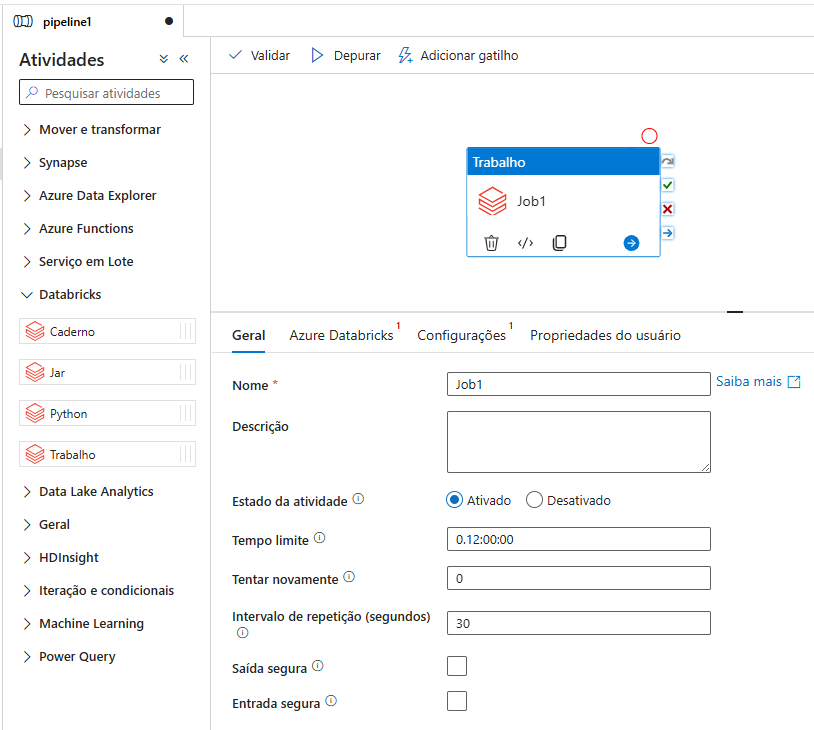
_New Databricks Job activity in ADF_
- Basic Configuration:
- Select or create a Databricks linked service
- Choose the workspace and the job you want to run
- Configure parameters, if needed
- Parameters and Monitoring:
- Define dynamic parameters to pass to the job
- Configure monitoring and retry options
- Connect the activity to other pipeline steps, if needed
Tips to Maximize the Benefits
To get the most out of this new feature, consider these tips:
- Migrate Gradually: Start by converting simple pipelines before tackling the more complex ones
- Consolidate Tasks: Group related tasks into a single job to reduce overhead
- Use Serverless: Configure your jobs to use serverless compute whenever possible
- Parameterize Everything: Use parameters to build flexible, reusable pipelines
- Monitor Performance: Compare metrics before and after the migration to quantify the gains
Important Considerations
Like any technology, there are a few limitations to keep in mind:
- The feature is in Preview and may change
- Some advanced monitoring features are still under development
- The actual savings depend on your specific workload profile
- Existing pipelines will need to be redesigned to take full advantage of the benefits
Conclusion
The new Databricks Job activity in Azure Data Factory is a significant leap in the evolution of the integration between these platforms. Just like the perfected DeLorean at the end of the “Back to the Future” trilogy, this update removes unnecessary complexity and opens up new possibilities for data engineers.
The benefits are clear: simpler architectures, more agile development, unified monitoring and, perhaps most impressive of all, the potential for significant cost savings. Our simulation showed that it’s possible to cut spending by up to 66% by migrating from classic pipelines to the new approach.
As Microsoft keeps investing in the Azure ecosystem, we can expect even more integrations and optimizations between Data Factory and Databricks. The future of data pipelines is just one click away in ADF: no 1.21 gigawatts or rare plutonium required.
Try the new feature today and discover how it can transform your data engineering journey. After all, as Doc Brown would say: “Roads? Where we’re going, we don’t need roads.” And with the new Databricks Job activity, you won’t need custom code or complex integrations either.
See you soon!