An overview and high-level comparison of Databricks and Snowflake, their strengths and their weaknesses.
Databricks and Snowflake are two big names in cloud data solutions. Both platforms have been key to helping companies generate value from their internal and external data assets. Each platform has its own distinct advantages and features, and their offerings have overlapped more and more, leaving many people unsure which solution best fits their business needs.
To start a meaningful comparison, we have to understand the history and core competency of each offering. To help with that, let’s go over the main differences between Snowflake and Databricks, including price, performance, integration, security and the best use cases, so each user can match them to their own needs.
Databricks vs. Snowflake: What are the main differences?
The first thing to understand about the two platforms is what they are and what problem they set out to solve.
Databricks is a unified, cloud-based data analytics platform for building, deploying and sharing data analytics solutions at scale. Databricks aims to provide a unified interface where users can store data and run jobs in interactive, shareable workspaces. These workspaces hold notebooks through which every compute function is built to run on cloud-based machines.
Snowflake, on the other hand, is a fully managed, cloud-based SaaS data warehouse. While Databricks was originally designed to unify data pipelines, Snowflake was designed to be the easiest data warehouse solution to manage. While Databricks’ target market is data scientists and data engineers, Snowflake’s target market is typically data analysts: people who are highly proficient in SQL queries and data analysis, but not so interested in complex computations or machine learning workflows.
Over time, Databricks and Snowflake have competed more and more, as each one hopes to expand its offering into an all-in-one cloud data platform. New products such as Snowflake’s Snowpark (which offers Python functionality) and Databricks’ DBSQL (its serverless data warehouse) have made it increasingly hard to tell the two offerings apart.
For now, most would agree that Snowflake tends to be the dominant name for easy-to-use cloud data warehouse solutions, and Databricks is the winner for cloud-based machine learning and data science workflows.
Databricks vs Snowflake: Data storage
Right now, Snowflake has the edge for querying structured data, and Databricks has the edge for the raw and unstructured data that ML needs. In the near future, I believe Databricks’ data lakehouse platform will be the dominant and most comprehensive market solution for all data management.
One of the biggest differences between Snowflake and Databricks is how they store and access data. Both lead the industry in speed and scale. The biggest difference between the two is the data warehouse vs. data lakehouse architecture, and the storage of unstructured vs. structured data.
Snowflake
At its core, Snowflake is a cloud data warehouse. It stores structured data in a closed, proprietary format for fast, seamless querying and transformation. Its proprietary format delivers high speed and reliability at the cost of flexibility. More recently, Snowflake has been allowing data ingestion and storage in additional formats (such as Apache Iceberg), but the vast majority of its customers’ data still lives in its own format.
Snowflake uses a multi-cluster shared disk architecture, in which compute resources share the same storage device but keep their own CPU and memory. To achieve this, Snowflake ingests, optimizes and compresses data into a cloud object storage layer, such as Amazon S3 or Google Cloud Storage. The data there is organized in a columnar format and split into micro-partitions of 50 to 500 MB. These micro-partitions store metadata, which helps a lot with speed. Interestingly, Snowflake’s own internal storage file format isn’t open source, which keeps most customers locked in.
To work efficiently, Snowflake uses several layers to give cloud processing workloads an enterprise experience. Snowflake maintains a cloud services layer that handles enterprise authentication and access control.
For execution, Snowflake uses virtual warehouses, which are abstractions over regular cloud instances (such as EC2). These warehouses query data from a separate data storage layer, effectively separating storage and compute. This separation of compute and storage makes Snowflake infinitely scalable and lets users run concurrent queries on the same data with reasonable isolation.
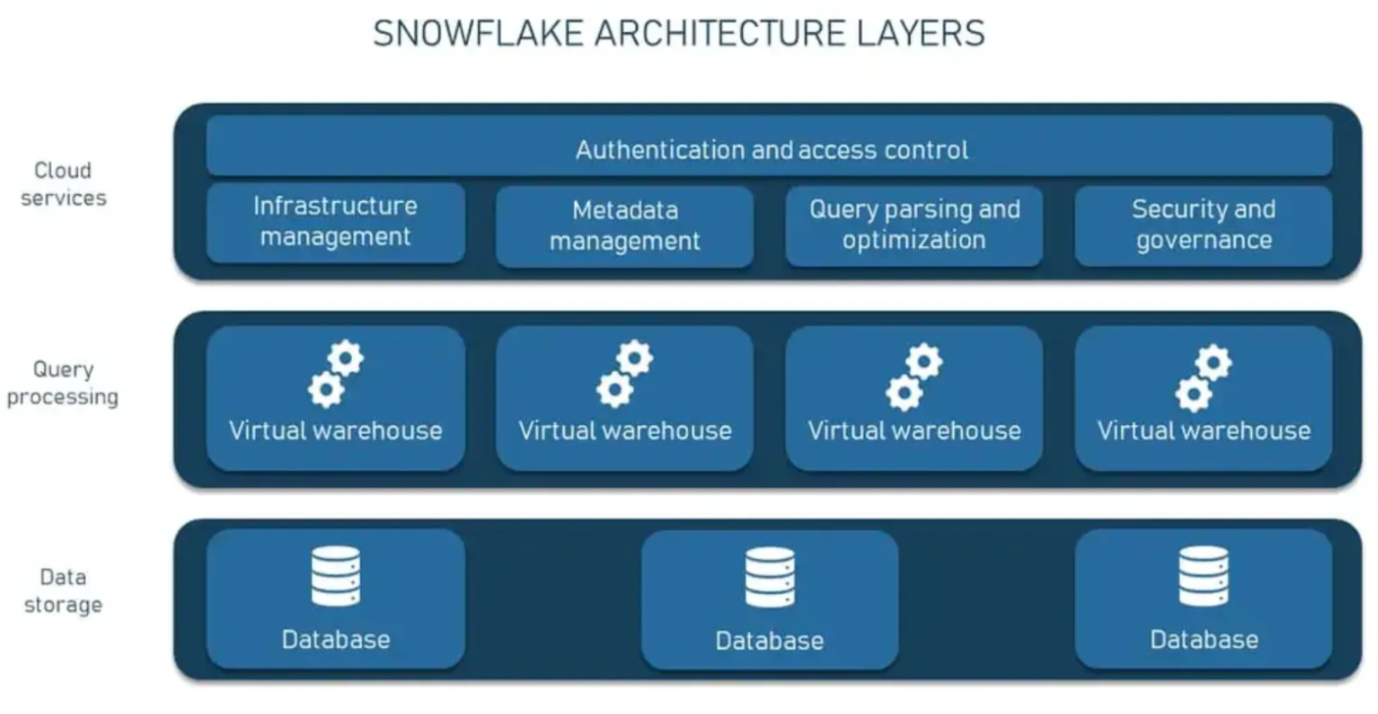
_Snowflake Architecture Layers_
Snowflake can run on all three major cloud service providers.
Bottom line: Snowflake’s architecture enables fast, reliable queries over structured data, at scale. It appeals to those who want simple ways to manage their jobs’ resource requirements (through T-shirt-sized warehouse options). It’s aimed mainly at people proficient in SQL, but it lacks the flexibility to easily handle raw and unstructured data.
Databricks
One of Databricks’ selling points is that it uses an open source storage layer known as Delta Lake, which aims to combine the flexibility of cloud data lakes with the reliability and unified structure of a data warehouse, without the challenges that come with vendor lock-in. Databricks pioneered this hybrid structure, called the “data lakehouse”, as a cost-effective way for data scientists, data engineers and analysts to work on the same data, regardless of structure or format.
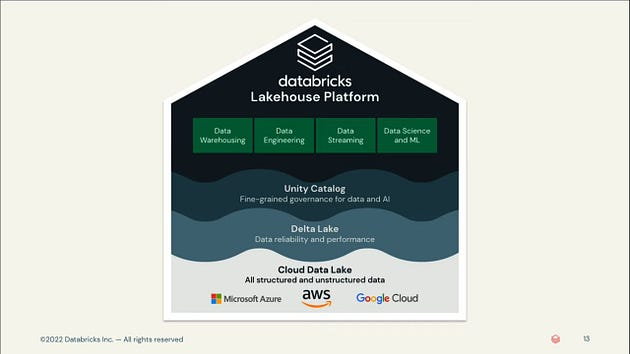
_Databricks Lakehouse_
The Databricks data lakehouse works by using three layers to allow raw and unstructured data to be stored, but it also stores metadata (such as a structured schema) for warehouse-like capabilities on structured data. Notably, this data lakehouse provides support for ACID transactions, automatic schema enforcement (which validates DataFrame and table compatibility before writes) and end-to-end streaming for real-time data ingestion: some of the most desirable advances for data lake systems.
Bottom line: Lakehouses bring the speed, reliability and fast query performance of data warehouses to the flexibility of a Data Lake.
Databricks vs Snowflake Scalability
Snowflake and Databricks keep battling for dominance over enterprise workloads. Although both have proven to be industry leaders in this capability, the biggest practical difference between the two lies in their resource management capabilities.
Snowflake
Snowflake offers compute resources as a serverless offering. That means users don’t need to select, install, configure or manage any software or hardware. Instead, Snowflake uses a series of virtual warehouses (independent compute resources containing memory and CPU) to run queries. This separation of memory and compute resources lets Snowflake scale infinitely without slowing down, and multiple users can query the same single segment of data at the same time.
Snowflake uses a simple “T-shirt size” scaling model for its virtual warehouses, with 10 sizes, each with twice the compute power of the previous size. The largest is the 6XL, which has 512 nodes. Since warehouses don’t share compute resources or store data, if one goes down, it can be replaced in minutes without affecting any of the others.

_A diagram of the virtual nodes associated with each warehouse size_
Most notably, Snowflake’s multi-cluster warehouses provide a “maximized” mode and an “auto-scale” mode, which give it the ability to dynamically shut down unused clusters, saving money.
Databricks
Databricks started with a much more “open”, traditional infrastructure, where basically all compute runs inside a user’s cloud VPC. This is the complete opposite of the “serverless” model, where compute runs inside Databricks’ VPC, since all cluster settings are exposed to end users. This has its pros and cons: the main advantage is that users can hyper-optimize their clusters to improve performance, but the downside is that it can be painful to use or require an expert to maintain.
More recently, Databricks has been moving toward the “serverless” model with Databricks SQL Serverless, and will probably extend this model to other products, such as notebooks. The pros and cons flip here: the pro is that users don’t have to worry about cluster settings; the con is that users have no access to or visibility into the underlying infrastructure and can’t customize the clusters to fit their needs.
Since Databricks is currently in a “transition” period between classic and “serverless” offerings, its scalability really depends on the use case people choose.
An important note is that Databricks has a diverse set of compute use cases, from SQL warehouses, Jobs, All Purpose Compute and Delta Live Tables to streaming, each with slightly different compute settings and use cases. For example, SQL warehouses can be used as a shared resource, where multiple queries can be sent to the warehouse at any time by multiple users. Jobs are more singular: a notebook runs on a cluster and then shuts down (jobs can also be shared now, but that’s less common).
Bottom line: When it comes to scaling to large workflows, both Snowflake and Databricks can handle the workload. However, Databricks is better able to boost and tune performance on large data volumes, which ultimately saves money.
Databricks vs Snowflake: Cost
Both Databricks and Snowflake are sold as pay-as-you-go models. In other words, the more compute you reserve/request, the more you pay. On both Databricks and Snowflake, users can and will pay for the resources they request, whether or not those resources are actually needed or ideal for running the job.
Another big difference between the two services is that Snowflake runs and charges for the entire compute engine (warehouses and cloud instances), while Databricks runs and charges only for managing the compute, so users still have to pay a separate bill to the cloud provider. It’s worth noting that Databricks’ new serverless product mimics Snowflake’s operating model. Databricks works with compute/time units called Databricks Units (or DBUs) per second, and Snowflake uses a system of Snowflake credits.
As a formula, it breaks down like this:
- Databricks (classic compute) = Data storage + Databricks service cost (DBUs) + Cloud compute cost (virtual machine instances)
- Snowflake = Data storage (average daily volume of bytes stored in Snowflake) + Compute (number of virtual warehouses used)
Both Databricks and Snowflake offer pricing tiers and discounts based on company size, and both let you save money by buying units or credits up front.
Databricks has more price variation, since prices differ by workload type, with certain types of compute costing 5x more per compute hour than simple jobs.
A big cost advantage Databricks has is that it lets users take advantage of Spot instances on their cloud provider, which can translate into significant savings. Snowflake hides all of this, and the end user has no way to benefit from Spot instances.
Bottom line: There’s no definitive answer as to which service is “cheaper”, because it really depends on how much of the service or platform you use and for what kinds of tasks. However, the control and introspection features Databricks provides are pretty much unmatched in the Snowflake ecosystem. That gives Databricks a significant advantage when optimizing for large compute workloads.
Databricks vs Snowflake: Ease of use
All things being equal, Snowflake is widely considered the “easier” cloud solution of the two to learn. It has an intuitive SQL interface and, as a serverless experience, doesn’t require users to manage any virtual or on-premises hardware resources. In addition, as a managed service, using Snowflake requires no installation, maintenance, upgrades or fine-tuning of the platform. Everything is handled by Snowflake.
Snowflake also has automated features such as auto-scaling and auto-suspend to help start and stop clusters without fine-tuning. Although Databricks also has autoscaling and autosuspend, it was designed for a more technical user, and there’s more involved in fine-tuning its clusters.
Bottom line: Although the Databricks user interface has a steeper learning curve than Snowflake’s, it offers more advanced control and customization, which makes this a trade-off that depends heavily on how complex you intend your operations to be.
Databricks vs. Snowflake: Ecosystem and Integration
Databricks and Snowflake are becoming the abstractions on top of the Cloud Vendors for data compute workloads. As such, both connect to a wide range of vendors, tools and products.
On the vendor side, both Databricks and Snowflake provide Marketplaces that let other prevailing tools and technologies be co-deployed. There are also community-built and community-contributed resources, such as the Databricks Airflow Operators / Snowflake Airflow Operators.
Overall, though, Databricks’ ecosystem is typically more “open” than Snowflake’s, since Databricks still runs in a user’s cloud VPC. That means users can still install custom libraries or even introspect low-level cluster data. That access isn’t possible in Snowflake, so integrating with your favorite tools can be harder. Databricks also tends to be generally more developer/integration-friendly than Snowflake for exactly this reason.
Databricks vs Snowflake: Which one is better?
Both Databricks and Snowflake have a solid reputation in the business and data community. Although both are cloud-based platforms, Snowflake is more optimized for data warehousing, data manipulation and querying, while Databricks is optimized for machine learning and heavy data science.
Broken down by component, here’s a list of advantages for each:
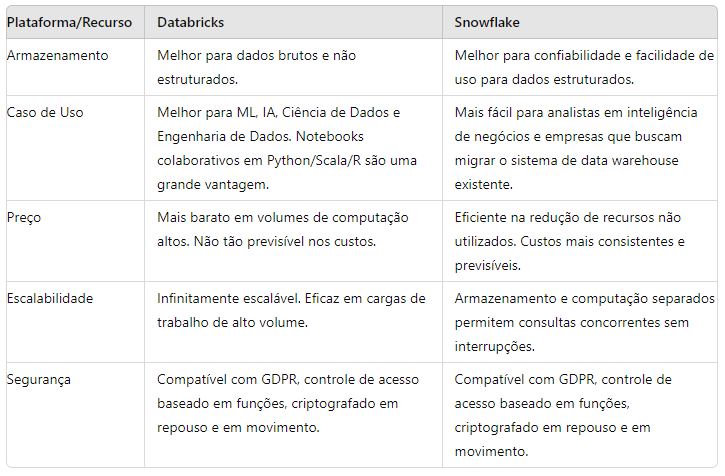
_Databricks vs Snowflake comparison_
With that, we conclude that if you want to integrate structured data into an existing ETL pipeline using structured data and tools such as Tableau, Looker and Power BI, Snowflake may be the right option for you. If, instead, you’re looking for a unified analytics workspace where you build compute pipelines, Databricks may be the right choice for you.
Thanks for reading! See you next time!
Reference Links
https://docs.databricks.com/en/introduction/index.html#etl-and-data-engineering
https://www.snowflake.com/en/data-cloud/snowpark/
https://www.informatica.com/resources/articles/what-is-a-cloud-data-warehouse.html
https://docs.snowflake.com/en/user-guide/warehouses-multicluster
https://www.snowflake.com/blog/industry-benchmarks-and-competing-with-integrity/