
This article reflects my personal experiences and points of view, not the official position of Microsoft or Databricks. In addition, although this post describes potential scenarios, it does not necessarily reflect Fabric’s roadmap or intentions. Not every option mentioned may become operational in the future.
In the dynamic, ever-evolving technology landscape, integrating different tools and platforms becomes essential to maximize efficiency and innovation. In the article “Connected Future: Unity Catalog and Microsoft Fabric Working Together,” we’ll explore how combining Unity Catalog, a robust data management solution from Databricks, with Microsoft Fabric, a powerful cloud and data application platform from Microsoft, is transforming the way organizations manage, analyze, and use their data. This collaboration promises not only to optimize data storage and governance, but also to speed up the development of insights and strategic decision-making, creating a more connected and intelligent future for companies in every industry.
The integration scenarios can essentially be viewed based on the entry point, Unity Catalog and Fabric:
Accessing Unity Catalog from Fabric (Fabric → Unity Catalog): This capability could let users seamlessly access Unity Catalog’s catalog, schemas, and tables from within Fabric.
Using Fabric from Unity Catalog (DBX/Unity Catalog → Fabric): This capability could give users the ability to access and use OneLake directly from Unity Catalog and run federated queries against a SQL endpoint or the Fabric Data Warehouse.
Let’s explore these scenarios in more detail.
Fabric → Unity Catalog
Using Unity Catalog from Fabric
If you’re in Fabric, here are some options for accessing Unity Catalog tables from Fabric. You can also read/write directly from Fabric Spark to ADLS Gen2.
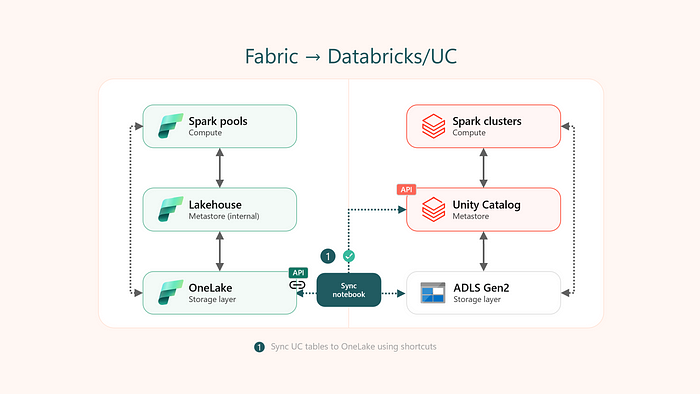
Current options
Today, users have two options for creating shortcuts to Unity Catalog tables: manual or semi-automatic, the latter being achievable through a notebook. With the semi-automatic method, users can bring external UC Delta tables into OneLake by creating shortcuts. They specify the catalog and schema names to sync, which generates shortcuts for the tables in those schemas inside the Fabric lakehouse.
See additional instructions on running the utility notebook.
# configuration
dbx_workspace = "<databricks_workspace_url>"
dbx_token = "<pat_token>"
dbx_uc_catalog = "catalog_example"
dbx_uc_schemas = '["schema1", "schema2"]'

fab_workspace_id = "<workspace_id>"
fab_lakehouse_id = "<lakehouse_id>"
fab_shortcut_connection_id = "<connection_id>"
fab_consider_dbx_uc_table_changes = True

# sync UC tables to lakehouse
sc.addPyFile('https://raw.githubusercontent.com/microsoft/fabric-samples/main/docs-samples/onelake/unity-catalog/util.py')
from util import *
databricks_config = {
    'dbx_workspace': dbx_workspace,
    'dbx_token': dbx_token,
    'dbx_uc_catalog': dbx_uc_catalog,
    'dbx_uc_schemas': json.loads(dbx_uc_schemas)
}
fabric_config = {
    'workspace_id': fab_workspace_id,
    'lakehouse_id': fab_lakehouse_id,
    'shortcut_connection_id': fab_shortcut_connection_id,
    "consider_dbx_uc_table_changes": fab_consider_dbx_uc_table_changes
}
sync_dbx_uc_tables_to_onelake(databricks_config, fabric_config)
Potential future options
Native Unity Catalog item in Fabric: similar to migrating Hive Metastore metadata to the Fabric lakehouse, Unity Catalog metadata could be synced with the Fabric lakehouse, enabling access to Unity Catalog tables. A preview of this scenario was demonstrated at FabCon, showing how users could directly access and query Unity Catalog tables using the Fabric interface.
Unity Catalog shortcut in Fabric: similar to Dataverse shortcuts, the OneLake shortcut user experience could potentially support creating shortcuts to Unity Catalog tables.
Databricks Unity Catalog → Fabric
Using Fabric and OneLake from Databricks Unity Catalog
Unity Catalog offers different ways to connect to and take advantage of cloud object storage connections (for example, ADLS Gen2), as well as to connect to external data systems to run federated queries (for example, Azure Synapse).
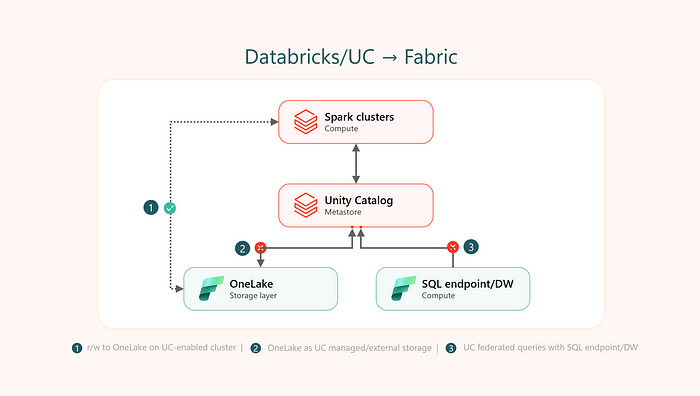
Current options
Today, users can use OneLake from Unity Catalog-enabled clusters as follows: (i) read/write to OneLake using Service Principal (SPN) based authentication, and (ii) read/write to OneLake using mount points with SPN authentication.
# r/w using spn
workspace_name = "<workspace_name>"
lakehouse_name = "<lakehouse_name>"
tenant_id = "<tenant_id>"
service_principal_id = "<service_principal_id>"
service_principal_password = "<service_principal_password>"

spark.conf.set("fs.azure.account.auth.type", "OAuth")
spark.conf.set("fs.azure.account.oauth.provider.type", "org.apache.hadoop.fs.azurebfs.oauth2.ClientCredsTokenProvider")
spark.conf.set("fs.azure.account.oauth2.client.id", service_principal_id)
spark.conf.set("fs.azure.account.oauth2.client.secret", service_principal_password)
spark.conf.set("fs.azure.account.oauth2.client.endpoint", f"https://login.microsoftonline.com/{tenant_id}/oauth2/token")

# read
df = spark.read.format("parquet").load(f"abfss://{workspace_name}@onelake.dfs.fabric.microsoft.com/{lakehouse_name}.Lakehouse/Files/data")
df.show(10)

# write
df.write.format("delta").mode("overwrite").save(f"abfss://{workspace_name}@onelake.dfs.fabric.microsoft.com/{lakehouse_name}.Lakehouse/Tables/dbx_delta_spn")
# mount with spn
workspace_id = "<workspace_id>"
lakehouse_id = "<lakehouse_id>"
tenant_id = "<tenant_id>"
service_principal_id = "<service_principal_id>"
service_principal_password = "<service_principal_password>"

configs = {
    "fs.azure.account.auth.type": "OAuth",
    "fs.azure.account.oauth.provider.type": "org.apache.hadoop.fs.azurebfs.oauth2.ClientCredsTokenProvider",
    "fs.azure.account.oauth2.client.id": service_principal_id,
    "fs.azure.account.oauth2.client.secret": service_principal_password,
    "fs.azure.account.oauth2.client.endpoint": f"https://login.microsoftonline.com/{tenant_id}/oauth2/token"
}

mount_point = "/mnt/onelake-fabric"
dbutils.fs.mount(
    source = f"abfss://{workspace_id}@onelake.dfs.fabric.microsoft.com",
    mount_point = mount_point,
    extra_configs = configs
)

# read
df = spark.read.format("parquet").load(f"/mnt/onelake-fabric/{lakehouse_id}/Files/data")
df.show(10)

# write
df.write.format("delta").mode("overwrite").save(f"/mnt/onelake-fabric/{lakehouse_id}/Tables/dbx_delta_mount_spn")
Note: Creating an external table using the OneLake abfss path or the mount path will currently result in an exception in Unity Catalog. Right now, you can’t register an external table in Unity Catalog with OneLake as the underlying storage. This could lead to potential future scenarios.
INVALID_PARAMETER_VALUE: Missing cloud file system scheme
Failed to acquire a SAS token for list. Invalid Azure Path
Potential future options
Similar to ADLS Gen2 and Azure Synapse, different options could exist in the future:
OneLake as the default managed storage: Databricks has started rolling out automatic Unity Catalog enablement, meaning a Unity Catalog metastore provisioned automatically with Databricks-managed storage (for example, ADLS Gen2). However, users can also create user-managed storage at the metastore level when creating the Unity Catalog metastore, pointing to OneLake in this case. That isn’t possible yet.
OneLake as an external location: External locations are used to define managed storage locations for catalogs and schemas, and to define locations for external tables and external volumes. For example, if users are working with external tables in Spark, OneLake could be used as an external location.
OneLake for Volumes: Volumes represent a logical volume of storage in a cloud object storage location, adding governance over non-tabular datasets. External and managed volumes could exist using OneLake, for example, just as they do for ADLS Gen2.
Federated Lakehouse: Read-only access to data in a SQL endpoint or the Fabric Data Warehouse using Unity Catalog foreign catalogs could be a future option. Current Azure Synapse and SQL authentication is based on username/password and SPN isn’t supported yet, so this option isn’t possible yet. Foreign catalogs don’t support object storage right now, so it’s still unclear whether a foreign catalog for OneLake/Lakehouse will be possible.