Released in December 2023, the Lakehouse Federation feature is currently in Public Preview, but it has enormous potential. In today’s article, I’ll explore some interesting perspectives, such as the ability to combine information across Databricks, BigQuery, SQL Server, and PostgreSQL in a single SQL query.
What is lakehouse federation?
Databricks lakehouse federation is a query federation feature that lets users and systems run queries against multiple data sources without having to migrate all the data into a unified system.
Here you eliminate the need to build complex ETLs, apply CDC, SCD, and other techniques, while also running the risk of the data drifting from the source, which can be very useful in a number of scenarios.
We can read federation, in its literal sense, as a way to democratize access to data from many sources through a single platform, delegating the processing work to the sources. In this context, federation makes it possible to speed up data exploration, avoid storage duplication, and gain other benefits.
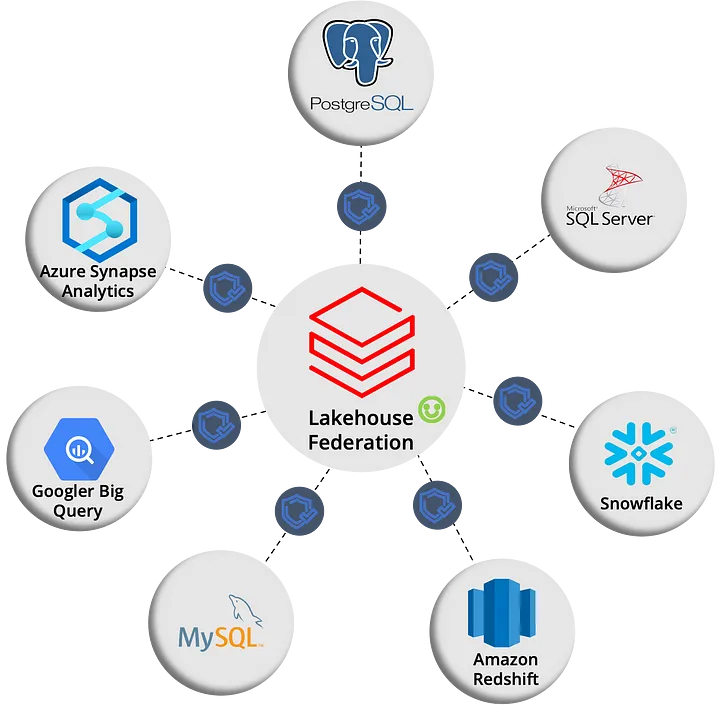
_Data Federation_
How does it work?
Databricks Lakehouse Federation uses Unity Catalog to manage distributed queries. To use Databricks Lakehouse Federation, you need to configure read connections using the drivers included natively in the clusters, such as Pro SQL Warehouses, Serverless SQL Warehouses, and Databricks Runtime >=13.1. The data sources currently supported include:
- MySQL
- PostgreSQL
- Amazon RedShift
- Snowflake
- SQL Server
- Azure Synapse
- Google BigQuery
- Databricks (with other workspaces)
In essence, Databricks sends queries to run on the source databases using native drivers like JDBC and returns the resulting data to Databricks in real time.
Advantages and Disadvantages
Agility: It lets you run queries on data coming from multiple sources (listed above) without having to migrate it, which can save time and resources.
Scalability: It can be used to connect to data sources of any size, allowing processing to be delegated to the source.
Governance: It uses Unity Catalog to manage data governance, ensuring the security and reliability of your data.
Potentially lower performance than traditional ETL methods, because the data isn’t moved into a unified system. This can result in network latency and possible performance issues, since not every filter and function can be sent to the source, which is known as “pushdowns.”
When you point queries at production OLTP environments, there’s a risk of overloading the sources’ performance, unlike more targeted ETLs or using CDC for data collection.
Limitations
It’s important to be aware of the limitations when using Lakehouse Federation:
- Read-only connections: The connections established are strictly for reading data.
- Pushdowns: Not every type of pushdown is supported, and that compatibility varies by data source.
- Data types: You need to pay attention to the mapping tables between the source and Databricks to ensure data type consistency.
- Case sensitivity: The system doesn’t support case-sensitive object names, so names are normalized to lowercase. This can cause problems depending on the data source.
- Source-specific limitations: Each data source may have its own limitations that need to be considered when implementing and using Lakehouse Federation.
In upcoming articles, we’ll take a hands-on look at Lakehouse Federation!
References
https://learn.microsoft.com/pt-br/azure/databricks/query-federation/
https://www.databricks.com/resources/webinar/query-federation-lakehouse