Imagine your data is like a couch potato who decided to get in shape. DBT (Data Build Tool) is the personal trainer who takes that data, builds the right workout plan (SQL transformations) and takes it to a new level of performance. Instead of just lifting random weights (traditional ETL), DBT takes a more efficient approach: it does the right exercises in the right order (ELT), making sure the data ends up lean and well defined inside the data warehouse.
With DBT, data analysts and engineers can write SQL queries to model and transform data without worrying about the underlying infrastructure. It also offers features like code versioning, automated documentation and data quality tests. After all, a good workout needs follow-up!
Why use DBT?
DBT has been gaining popularity for several reasons:
- Ease of Use: It lets data analysts and engineers write SQL transformations without dealing with complex infrastructure.
- Modularity: It makes it easy to create reusable, well-organized pipelines, like a good workout split by muscle group.
- Versioning and Control: Since DBT uses Git repositories, it’s easy to track changes and roll back to previous versions, just like a personal trainer adjusts a workout plan based on progress.
- Data Quality Tests: It includes features to make sure transformed data is consistent and reliable. Nobody wants a badly designed workout that causes injuries (data errors!).
- Automatic Documentation: It generates detailed documentation about the models you create, like a training log that records every bit of progress.
- Compatibility with Modern Data Warehouses: It works with BigQuery, Snowflake, Redshift, Databricks and others.
How do you install DBT?
Getting ready to use DBT is like signing up for the gym: a simple process, but one that takes commitment.
Step 1: Install DBT
Run the following command in the terminal:
pip install dbt-core
If you’re using a specific data warehouse, also install the matching adapter. For example, for Snowflake:
pip install dbt-snowflake
Step 2: Configure DBT
After installing, initialize a new DBT project:
dbt init meu_projeto
This creates the basic directory and file structure you need to start using DBT.
Step 3: Test the Connection
Before running models, it’s important to test the connection to the configured data warehouse:
dbt debug
If everything checks out, DBT is ready to run transformations and optimize your data environment!
How does DBT work?
DBT works like a well-structured training program: it takes the raw data (the out-of-shape student), applies SQL transformations (the right exercises) and delivers optimized results (data ready for analysis).
DBT’s main components are:
- Models: SQL transformations applied to the data, like specific workouts for different muscle groups.
- Seeds: Static datasets, like the diet the personal trainer adjusts to support the workouts.
- Snapshots: Records of changes over time, like before-and-after progress photos.
- Tests: Automatic checks to ensure quality, like regular health checkups to make sure the plan is working.
- Documentation: Automatic generation of documentation based on the models’ code, like a workout notebook that records every session.
On top of that, to transform data workflows it uses SQL (.sql) and YAML (.yml) scripts.
- SQL scripts: Help transform data in a modular way, using CTEs (Common Table Expressions) to create reusable, organized processes.
- YAML scripts: Let you define schemas, descriptions and test rules for columns, such as not_null, unique and other validations, ensuring data integrity and quality.
DBT runs these transformations efficiently, creating a clear, modular structure inside the data warehouse.
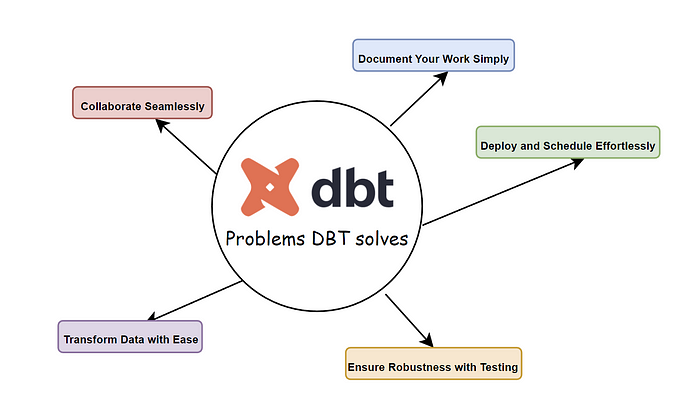
_What problems does DBT solve?_
How do you use DBT? A hands-on example with a multidimensional model and medallion layers
Let’s take the example of an e-commerce company that wants to build a multidimensional model for sales analysis, following the medallion layer approach (Bronze, Silver and Gold).
Step 1: Building the Bronze Layer (Raw Data)
The Bronze layer receives data straight from S3, where it’s stored in its raw format. To access this data in DBT, we use the source feature, which points to the corresponding bucket:
version: 2
sources:
  - name: ecommerce
    schema: raw
    tables:
      - name: vendas_raw
        external:
          location: 's3://meu-bucket/raw/vendas/'
          format: 'parquet'
With this configuration, we can reference the data directly in DBT:
SELECT *
FROM {{ source('ecommerce', 'vendas_raw') }};
The Bronze layer stores the data exactly as it was received, with no transformation:
SELECT *
FROM {{ source('ecommerce', 'vendas_raw') }};
Step 2: Building the Silver Layer (Transformation and Cleanup)
Here we apply cleanup, deduplication and formatting rules:
WITH vendas_limpa AS (
    SELECT
        pedido_id,
        cliente_id,
        produto_id,
        data_venda,
        quantidade,
        preco_unitario,
        quantidade * preco_unitario AS valor_total
    FROM {{ ref('bronze_vendas') }}
    WHERE data_venda IS NOT NULL
)
SELECT * FROM vendas_limpa;
Step 3: Building the Gold Layer (Final Model for Analysis)
In this layer, we create a model optimized for multidimensional analysis:
WITH vendas_agrupadas AS (
    SELECT
        data_venda,
        produto_id,
        SUM(quantidade) AS total_quantidade,
        SUM(valor_total) AS total_vendas
    FROM {{ ref('prata_vendas') }}
    GROUP BY data_venda, produto_id
)
SELECT * FROM vendas_agrupadas;
Step 4: Building dimensions
We also create supporting dimensions, such as dim_cliente.sql:
SELECT
    cliente_id,
    nome,
    email,
    cidade,
    estado
FROM {{ ref('prata_clientes') }};
And dim_produto.sql:
SELECT
    produto_id,
    nome_produto,
    categoria
FROM {{ ref('prata_produtos') }};
These tables work like specific exercises for different muscle groups, helping to strengthen and better organize the data.
Step 5: Building relationships and analyses
With the tables in place, we can run queries in the data warehouse that relate the data and build analytics dashboards, as if we were fine-tuning the workout to get maximum performance out of the results.
How to consume the data via DBT
After processing and transforming the data with DBT, the next step is to consume it in visualization and analytics tools such as Power BI. Power BI can connect directly to the data warehouse where the DBT models were created, enabling interactive reports and efficient dashboards.
Connecting Power BI to the Data Warehouse
If your DBT is set up on a data warehouse like Snowflake, BigQuery or Redshift, follow the steps below to consume the data in Power BI:
- Open Power BI and select “Get Data”.
- Choose the data source that matches your data warehouse (for example, “Amazon Redshift”, “Google BigQuery” or “Snowflake”).
- Enter the database access credentials.
- Select the table that corresponds to the data model transformed by DBT.
- Create measures and calculations in Power BI for additional analysis.
- Build interactive charts, tables and dashboards.
Sample Query in Power BI
If your data warehouse is Snowflake, a simple SQL query to load sales data into Power BI could be:
SELECT
    data_venda,
    produto_id,
    total_quantidade,
    total_vendas
FROM ouro_vendas;
After loading the data, you can use Power BI’s features to build trend charts, sales KPIs and dynamic dashboards that support decision-making.
How to use a CI/CD pipeline for load and orchestration scripts with Airflow
To make sure the transformations done with DBT run reliably and automatically, we can use a CI/CD pipeline combined with Apache Airflow to orchestrate the data pipelines.
Implementing CI/CD for DBT
The CI/CD (Continuous Integration/Continuous Deployment) process for DBT involves versioning, automated testing and continuous deployment of changes to the data models. Here’s a basic flow:
- Code Versioning: The SQL code for the DBT models is managed in Git.
- Automated Tests: Data integrity tests run automatically on every change.
- Automated Deploy: With tools like GitHub Actions, GitLab CI/CD or Jenkins, the updated code is automatically deployed to the production environment.
- Scheduling and Execution: Airflow orchestrates the execution of the data transformation pipelines.
Orchestrating with Airflow
Apache Airflow is a powerful tool for managing and scheduling data pipelines. We can use it to orchestrate the data layers (Bronze, Silver and Gold) efficiently.
Example of an Airflow DAG to orchestrate the medallion model layers:
from airflow import DAG
from airflow.operators.bash import BashOperator
from datetime import datetime

default_args = {
    'owner': 'airflow',
    'depends_on_past': False,
    'start_date': datetime(2024, 1, 1),
    'retries': 1,
}

dag = DAG(
    'dbt_medalhao_pipeline',
    default_args=default_args,
    schedule_interval='@daily',
    catchup=False
)

bronze = BashOperator(
    task_id='bronze_layer',
    bash_command='dbt run --models bronze',
    dag=dag
)

prata = BashOperator(
    task_id='prata_layer',
    bash_command='dbt run --models prata',
    dag=dag
)

ouro = BashOperator(
    task_id='ouro_layer',
    bash_command='dbt run --models ouro',
    dag=dag
)

bronze >> prata >> ouro
In this example:
- The Bronze layer is loaded first.
- Next, the data is cleaned and transformed in the Silver layer.
- Finally, the data is aggregated and modeled for analysis in the Gold layer.
This approach ensures the data is processed correctly within a well-organized structure, providing better governance and reliability.
DBT Pricing
DBT offers a free open source version, plus a SaaS version called DBT Cloud, which includes additional features like a web interface, job scheduling and stronger enterprise support. DBT Cloud pricing varies with data volume and number of users, but generally ranges from free plans up to custom pricing for large companies.
Practical applications of DBT
DBT is widely used by companies that want to improve their data transformation processes. Some common applications include:
- Building Data Marts: Creating data models optimized for BI and business analysis.
- Data Quality Monitoring: Applying tests to ensure the integrity of the information.
- Auditing and Traceability: Enabling versioning and tracking of the transformations applied.
- Data Pipeline Automation: Making repetitive, scalable processes easier to run.
How to learn DBT
If you want to go deeper into DBT and become an expert, there are several ways to learn.
Courses on DBT Learn
DBT’s official learning platform, DBT Learn, offers free and paid courses for beginners and advanced users. There you’ll find interactive tutorials, hands-on exercises and guided training to learn how to use DBT effectively.
DBT Certifications
For those who want to prove their knowledge, DBT offers official certifications. These certifications validate your skills in building data models, versioning, testing and automation with DBT. Besides sharpening your skills, a certification can be a differentiator in the job market.
Other resources include the official documentation, YouTube videos and technical blogs covering best practices and real-world use cases.
Conclusion
DBT is like a personal trainer for your data: it makes sure every transformation is done right, strengthening your data pipeline and delivering quality insights. If your company is looking to optimize data modeling and analysis, DBT may be the ideal choice to get off the digital couch!
What’s more, as more companies adopt DBT, the community around the tool keeps growing. That means more support, more tutorials and more best practices available to new users, making it easier to adopt and improve the solution.
If you haven’t tried DBT yet, maybe it’s time to add it to your data workout plan. After all, nobody wants an out-of-shape database full of slow queries and redundancy. It’s time to turn your data into true information athletes! DBT is like a personal trainer for your data: it makes sure every transformation is done right, strengthening your data pipeline and delivering quality insights. If your company is looking to optimize data modeling and analysis, DBT may be the ideal choice to get off the digital couch!