
Introduction
Databricks Unity Catalog makes it easier for your team to understand its data. It automatically generates information about how data is used, based on cluster consumption logs. This reflects how customers use the Data Intelligence Platform, offering excellent discoverability and context for optimizations.
In this article I want to teach you how to use lineage data to audit data usage through the Unity Catalog System Tables. I’ll start with an overview of the lineage tables and then show how to analyze data usage to understand who is accessing which data, from where and when.
Overview
With Databricks Unity Catalog, we get lineage information as our users work. Dependency relationships are tracked while users prepare and organize data. Metadata is generated automatically, giving your data immediate context and meaning.
That context speeds up the work of key users:
- Data analysts and data scientists: They can understand where data comes from directly, reducing confusion about which table or metric to use for a model or report. This speeds up delivery and increases trust in the data.
- Data governance: Owners, stewards, and security and privacy officers can use table access and usage information to understand how often data is used and track access patterns.
Lineage is available in the Catalog interface, where it’s expressed as visual graphs showing dependency relationships. The image below shows the lineage for three views generated from the system tables. Table and column lineage are also available:
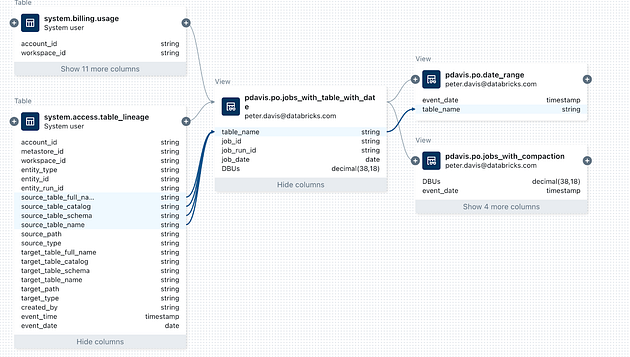
_Unity Catalog lineage_
We can also query lineage directly in the system tables through Notebooks or the SQL Editor. We can query table lineage to see upstream/downstream tables and analyze data usage, such as who accesses the data, when and how. The example below shows every access to the billing usage table in the last seven days:
SELECT
 *
FROM
 system.access.table_lineage
WHERE
 source_table_full_name = 'system.billing.usage'
AND datediff(now(), event_date) < 7
If you want a quick view of a table’s activity over the last 30 days, you can open the table insights directly in the user interface. The UC Insights tab provides information about recent activity, users, queries and more.
Overview of the lineage tables
The lineage system tables in Databricks let you query lineage data at the table and column level in the system.lineage.table_lineage and system.lineage.column_lineage tables.
Both lineage system tables follow the same schema, with two additions for column-level lineage, as shown below:
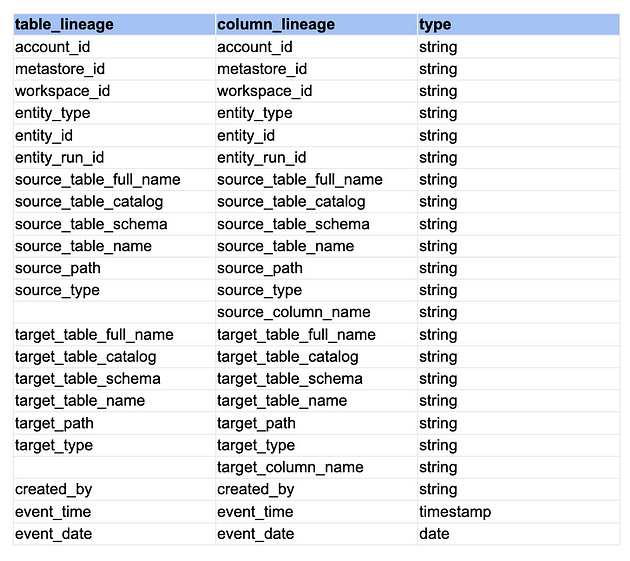
_Table of Names and Columns_
To determine whether the event was a read or a write, you can check the source_type and target_type fields.
- Read only: The source type is not null, but the target type is null.
- Write only: The target type is not null, but the source type is null.
- Read and write: Both the source and target types are not null.
In the rest of the article, I’ll explore some use cases highlighting data access auditing and data object popularity, demonstrate techniques for analyzing your lineage data, and we’ll build a dashboard you can customize to get insights.
In this article we have four sets of code: a notebook for exploring the lineage table data and three dashboards that show some of the notebook’s results. All of them can be used right away in any workspace where Unity Catalog and the system tables are enabled.
Data Exploration: Setting Up the Analysis
At the beginning of the notebook, we set variables for running the subsequent queries. Please adjust the values to match your environment.
DECLARE OR REPLACE VARIABLE catalog_val STRING;
DECLARE OR REPLACE VARIABLE target_catalog_val STRING;
DECLARE OR REPLACE VARIABLE schema_val STRING;
DECLARE OR REPLACE VARIABLE table_val STRING;
DECLARE OR REPLACE VARIABLE column_val STRING;
DECLARE OR REPLACE VARIABLE email_val STRING;
DECLARE OR REPLACE VARIABLE table_full_name_val STRING;

SET VARIABLE catalog_val = 'system';
SET VARIABLE target_catalog_val = 'pdavis';
SET VARIABLE schema_val = 'billing';
SET VARIABLE table_val = 'usage';
SET VARIABLE column_val = 'usage_quantity';
SET VARIABLE table_full_name_val = concat(catalog_val, '.', schema_val, '.', table_val)
SET VARIABLE email_val = 'demo@databricks.com';
Table Access by User:
See which users accessed a table and which Databricks interface they used in the last 7 days:
- Users: Identify the users who accessed the table.
- Interfaces: Check whether they used notebooks, jobs or other Databricks interfaces to access the table.
This will help you understand how different users access and use tables over a one-week period.
SELECT
 mask(created_by) as created_by, -- Masking function - nice feature
 entity_type,
 source_type,
 COUNT(distinct event_time) as access_count,
 MIN(event_date) as first_access_date,
 MAX(event_date) as last_access_date
FROM
 system.access.table_lineage
WHERE
 source_table_catalog = catalog_val
 AND source_table_schema = schema_val
 AND source_table_name = table_val
 AND datediff(now(), event_date) < 7
 AND entity_type IS NOT NULL
 AND source_type IS NOT NULL
GROUP BY
 ALL -- Nice feature
ORDER BY
 ALL -- Nice feature
Here we get a result with the email addresses (created_by), interfaces (entity_type), first and last access dates, and the table access count.
I limited the total period to one week to minimize resource usage during exploration, and I use a masking function to hide the email addresses in the created_by field for this article.
Table access within a specific catalog and schema:
SELECT
 source_table_name,
 entity_type,
 created_by,
 source_type,
 COUNT(distinct event_time) as access_count,
 MIN(event_date) as first_access_date,
 MAX(event_date) as last_access_date
FROM
 system.access.table_lineage
WHERE
 source_table_catalog = catalog_val
 AND source_table_schema = schema_val
 AND datediff(now(), event_date) < 30
GROUP BY
 ALL
ORDER BY
 ALL
Here we see every table accessed within a specific catalog and schema in the last 30 days, who accessed it and the first and last access dates.
Table Access by Specific Users
Which tables a specific user accessed in the system catalog in the last 90 days:
SELECT
 source_table_catalog,
 source_table_schema,
 source_table_name,
 entity_type,
 source_type,
 mask(created_by) as created_by,
 COUNT(distinct event_time) as access_count,
 MIN(event_date) as first_access_date,
 MAX(event_date) as last_access_date
FROM
 system.access.table_lineage
WHERE
 created_by = email_val
 AND datediff(now(), event_date) < 90
 and entity_type is not NULL
 and source_table_catalog = 'system'
GROUP BY
 ALL
ORDER BY
 ALL
Object Lineage
For a single object, which objects are immediately upstream (before it) and downstream (after it)?
with downstream AS (
select
  distinct target_table_catalog as table_catalog,
  target_table_schema as table_schema,
  target_table_name as table_name,
  'downstream' as direction,
  CASE WHEN tbl.table_catalog is null then 'no' else 'yes' end as current
from
  system.access.table_lineage tl
  left join system.information_schema.tables tbl
  on tl.target_table_full_name = concat(tbl.table_catalog, '.', tbl.table_schema, '.', tbl.table_name)
where
  source_table_full_name = table_full_name_val
  AND target_table_full_name is not null
 order by current desc, table_catalog, table_schema, table_name
)
,
upstream AS (
select
  distinct source_table_catalog as table_catalog,
  source_table_schema as table_schema,
  source_table_name as table_name,
  'upstream' as direction,
  CASE WHEN tbl.table_catalog is null then 'no' else 'yes' end as current
from
  system.access.table_lineage tl
  left join system.information_schema.tables tbl
  on tl.source_table_full_name = concat(tbl.table_catalog, '.', tbl.table_schema, '.', tbl.table_name)
where
  target_table_full_name = table_full_name_val
  AND source_table_full_name is not null
 order by current desc, table_catalog, table_schema, table_name
)
select * from upstream
UNION ALL
select * from downstream
Shall we put it all together? Dashboards
The following dashboards will help you start analyzing the Unity Catalog lineage tables. Users are encouraged to try the dashboards and then customize them to whatever is most useful in their environment.
We have three dashboards with the following features:
- Table lineage
- Column lineage
- Tags and column lineage
Table lineage
Putting it all together, I built a dashboard to show:
- Table accesses by date
- Columns in use in the table
- Who accessed the table and through which interfaces
- Related upstream/downstream tables (including deprecated dependencies)
By importing the dashboard and entering any three-level table name, you can review the same information about tables (as long as you have permission to see the table’s metadata).
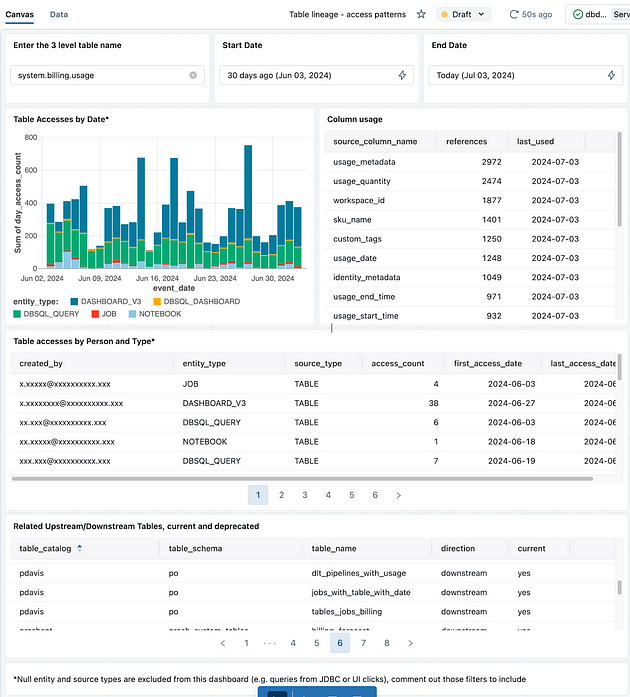
_Table Lineage Dashboard_
Column lineage
I added a dashboard to review column lineage information. This dashboard shows:
- The count of tables with the same column name
- How many objects depend on that column
- Total accesses to the column during the specified period
- A chart of accesses over time
- A table showing how often the column is used downstream
- A table showing who accessed the column, from which interface, how many accesses were made, and the first and last access dates within the period
It also shows tables that have the same column name and their usage frequency counts.
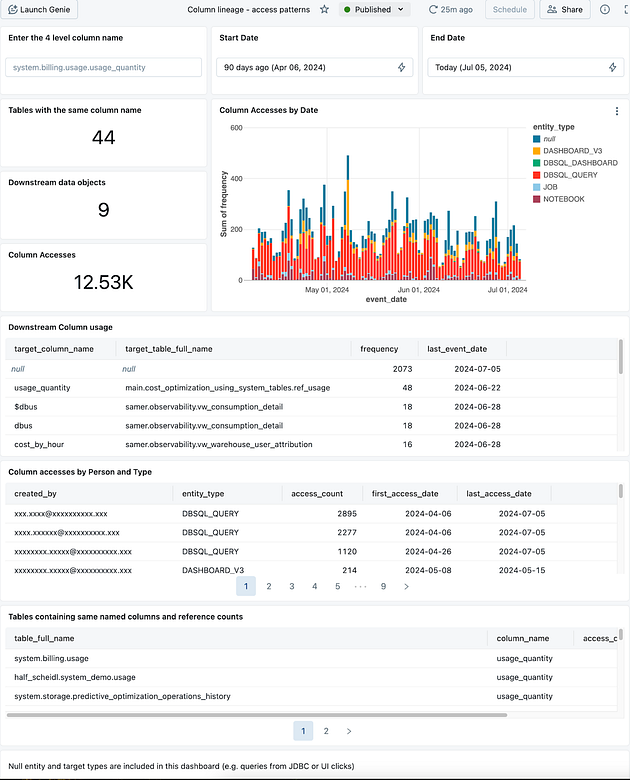
_Column Lineage Dashboard_
Tags and Lineage Dashboard
Finally, I built a dashboard to review tags in the system:
- Tag name and value heat map: Helps you understand how people use tags and reduce potential tag noise across the company.
- List of tagged column names: Shows the columns that were tagged with a given name or value (masked in this example).
- Total accesses to tagged columns: Shows how many times the tagged columns were accessed during the specified period.
- Lists of tagged Catalogs, Schemas and Tables: Displays the objects that were tagged (masked for the example).
- List of tagged columns accessed: Shows who accessed these columns and how (again, masked for the example).
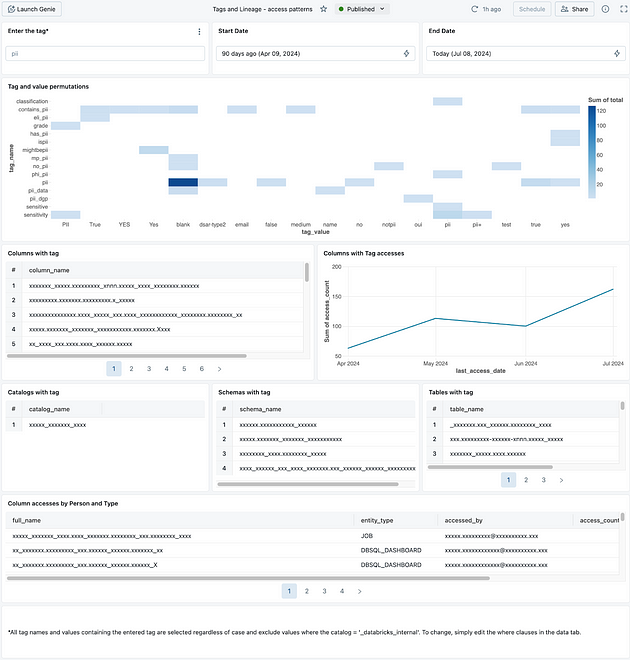
_Tags and Lineage Dashboard_
Current Limitations
The Lineage System Tables are currently in Public Preview. As the tables move toward GA, columns, schemas and retained data may change.
Not every entity type is trackable at the moment; the entity type will be NULL for untracked types.
Conclusion
In this article, we explored how Databricks Unity Catalog simplifies auditing and understanding data usage. Using the Unity Catalog System Tables, we can track and analyze data lineage. This helps us see clearly who is accessing which data, from where and when, which improves data governance and the efficiency of data analysts’ and data scientists’ work.
We showed how to query lineage directly in the system tables, either through Notebooks or the SQL Editor. This enables a detailed analysis of data access and usage. We also presented practical query examples for monitoring table access, data object popularity and access patterns.
The dashboards we showed are valuable tools for visualization and analysis, offering insights into table access, the use of specific columns and the use of tags in the system. Even while in Public Preview, the Lineage System Tables already provide significant support for data governance and process optimization on the Databricks platform.
With these capabilities, teams can make better-informed decisions, increase trust in their data and make better use of the available resources. Unity Catalog, with its lineage capabilities, is essential to any modern data management strategy.
I hope this article helps you implement your governance!
Thanks for reading!