
Remember your grandma’s apple pie? That special recipe that took hours to make, but always came out perfect? The modern Human Resources department faces a similar dilemma: how to keep the handcrafted quality of talent selection without spending hours analyzing every resume one by one?
Just as grandma knew every ingredient and knew exactly when the pie was ready, experienced recruiters develop a “sixth sense” for spotting good candidates. But what if we could automate that process, keeping the same quality and judgment, but with the efficiency of a modern kitchen?
Azure AI Foundry offers all the tools you need to create this “version 2.0” of grandma’s recipe: an intelligent agent that keeps the same quality ingredients (experience, rigorous criteria, attention to detail), but uses modern technology to bake the “perfect pie” in a fraction of the time.
The Scenario: Why Do We Need a Digital Recruiter?
Imagine an HR department that receives 500 resumes a week for different positions. Every resume has to be read, analyzed, and compared against the job requirements. An experienced recruiter takes, on average, 10 minutes to do a complete initial analysis of a resume. That means more than 80 hours a week just for initial screening: more than two weeks of one person’s work.
Beyond the time issue, there’s the challenge of consistency. Different recruiters may interpret the same requirements slightly differently, especially when they’re tired or under pressure. A candidate evaluated on Monday morning may get a different analysis from the same candidate evaluated on Friday afternoon.
Azure AI Foundry Agent Service solves these problems by creating a digital assistant that keeps criteria consistent, works 24 hours a day, and can process dozens of resumes at the same time. It’s like having an HR specialist who never has a bad day and always applies exactly the same evaluation standards.
The Recipe’s Secret Ingredients
Just as grandma’s apple pie had specific ingredients that made all the difference, our digital recruiting system also needs the right components to work perfectly. Each “ingredient” plays a specific role in building an intelligent, efficient system.
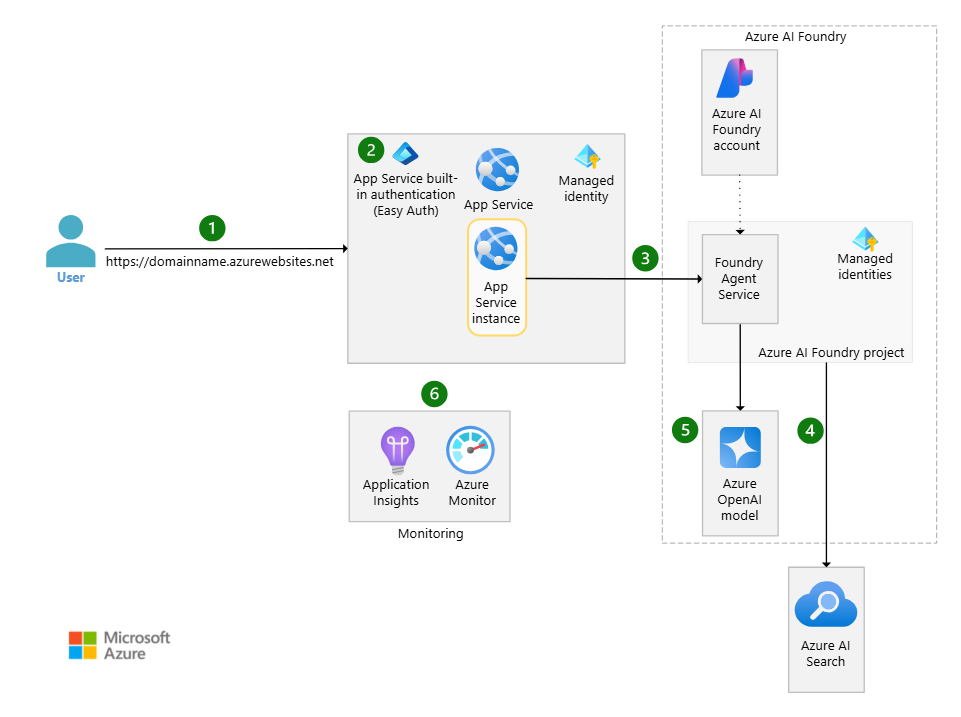
_Complete Azure AI Foundry architecture showing the integration between all the components of our digital recruiting system_
Azure AI Foundry Agent Service is like grandma’s oven. It’s the heart of the operation, where the magic happens. This is where we define our agent’s instructions, its capabilities, and how it should behave when analyzing resumes. Think of it as grandma’s accumulated knowledge, but encoded precisely and consistently.
Azure Blob Storage works like grandma’s well-organized pantry, where all the ingredients (resumes) are stored safely and accessibly. The advantage is that this “digital pantry” can hold millions of documents without losing its organization.
Azure AI Search is like grandma’s secret recipe notebook, but supercharged. It doesn’t just organize resumes by keyword, it understands the “flavor” of each professional profile. It can find candidates with “leadership experience” even when the resume only mentions “team coordination.”
The File Search Tool is the magic utensil that ties everything together, like the special wooden spoon grandma used for every dish. It lets the agent access, read, and analyze the resumes, using all of the system’s intelligence to find the right “ingredients” for each job.
Step 1: Preparing the Resume Archive - Azure Blob Storage
The first step in building our digital recruiter is to create a secure, organized place to store all the resumes. Azure Blob Storage will be our “digital file room,” where every document is perfectly cataloged and accessible.
Setting up Azure Blob Storage requires special attention to the folder structure. An efficient organization can be by department, by job, or by period. For example: /curriculos/2025/desenvolvedor-senior/ or /curriculos/marketing/analista-digital/. This organization makes things easier both for the agent’s access and for future maintenance of the system.
It’s important to set access permissions properly from the start. The storage should allow read access for the AI services we’ll create later, but keep strict controls over who can add, modify, or delete resumes. Using Azure managed identity-based authentication is recommended for greater security.
The container structure should reflect the company’s organization. One main container for active resumes, another for historical files, and possibly separate containers for different business units. This makes it easier to manage retention and access policies.
Step 2: Building the Search Brain - Azure AI Search (RAG)
With the resumes organized in Blob Storage, we need to build the system that will let our agent “understand” and search for information in those documents. Azure AI Search works as our agent’s RAG (Retrieval-Augmented Generation) system, turning documents into searchable knowledge.
Azure AI Search is much more than a traditional search engine. It processes the resumes, extracts text, creates vector representations of the content, and builds indexes optimized for semantic search. It’s like having a super-smart librarian who not only knows where every document is, but also understands the meaning of every word and concept.
Configuring the parsing mode is crucial to the system’s success. For resumes, we recommend using “Default” mode, which automatically detects the file type and applies the most appropriate parser. This ensures that both PDFs and Word documents are processed correctly, extracting not just text but also important metadata.
The indexing process turns each resume into a searchable structure. The system automatically splits the documents into smaller chunks, creates vector embeddings for semantic search, and builds inverted indexes for keyword search. It’s this combination that lets the agent find candidates with “leadership experience” even when the resume only mentions “team management.”
The connection to Blob Storage establishes the data pipeline. Whenever new resumes are added to storage, AI Search automatically processes them and updates the index. It’s like having an assistant who keeps the library always organized and up to date.
Step 3: Creating the Command Center - Azure AI Foundry Hub
With our database and search system ready, it’s time to create the “command center” where our agent will be developed and managed. The Azure AI Foundry Hub works as the headquarters of our AI operation.
The Azure AI Foundry Hub centralizes resources, security settings, and connectivity. This is where we define which Azure services our agent can access and how it should authenticate. Think of the Hub as the headquarters of an intelligence operation, where all the tools and resources are kept organized and secure.
Setting up the Hub includes connecting it to the services we created earlier. The Hub needs access to Blob Storage (to read resumes) and to AI Search (to run intelligent searches). These connections are established using managed identities, ensuring security without having to manage keys manually.
Inside the Hub, we create a Project specifically for our HR agent. Projects let you organize different agents and experiments, keeping settings and data separate. It’s like having different departments inside the same company: each with its own specific responsibilities, but all sharing the Hub’s common infrastructure.
The Hub’s security settings determine who can access the project, create agents, and view data. It’s important to establish clear policies from the start, defining different levels of access for developers, administrators, and end users of the system.
Step 4: Bringing the Recruiter to Life - Creating the Agent
With all the infrastructure in place (Blob Storage organizing the resumes, AI Search working as the RAG brain, and the Hub centralizing everything), it’s time to bring our digital recruiter to life. Creating the agent is where we define its personality, its skills, and how it should behave when analyzing resumes.
The agent’s instructions are fundamental to its success. They should be clear, specific, and comprehensive. An example of an effective instruction would be: “You are a recruiting specialist with 15 years of experience. Your role is to analyze resumes and assess how well candidates fit the open positions. Always consider relevant experience, academic background, technical skills, and soft skills. Be objective but fair in your assessments.”
Configuring the File Search Tool connects the agent to the stored resumes. This tool automatically processes the documents, creating text chunks of approximately 800 tokens with a 400-token overlap. This ensures that important information isn’t lost when the content is split.
Connecting to Blob Storage establishes the link between the agent and the data. The system automatically monitors new files added to storage and includes them in the search index. It’s like having an assistant who always keeps the resume base up to date.
Connection tests are essential before putting the agent into production. Start with a few test resumes and known job openings. Check that the agent can access the documents, extract relevant information, and provide coherent analyses.
Feeding the System: Uploading and Organizing the Resumes
A digital recruiter is only as good as the quality and organization of the data it can access. How we organize and feed the resume base directly determines how effective the analyses are.
The folder structure in Blob Storage should reflect the reality of the business. An efficient approach is to create hierarchies that make both searching and maintenance easier. For example: /curriculos/ano/departamento/nivel/ allows specific filters and makes it easier to manage old data.
Supported file formats include PDF, Word (.doc and .docx), plain text, RTF, and many others. The system automatically detects the format and applies the appropriate processing. PDFs with selectable text work better than scanned images, although the system can also process the latter with OCR.
Indexing happens automatically when new files are added to Blob Storage. Azure AI Search processes the content, extracts text, creates vector embeddings, and updates the index. This process can take a few minutes for large files or many files at once.
Creating Vector Stores organizes the resumes into structures optimized for semantic search. Each Vector Store can hold up to 10,000 files and can be attached either to the agent (for permanent resumes) or to specific threads (for temporary analyses of specific openings).
Training the Specialist: Prompts and Instructions
The quality of our digital recruiter’s analyses depends directly on the quality of the instructions we give it. It’s like training a new employee: the clearer and more specific the guidance, the better the results.
An effective prompt for resume analysis should include context, specific criteria, and the expected response format. For example: “Analyze this resume for the Senior Python Developer position. Evaluate: 1) Python experience (minimum 5 years), 2) Knowledge of web frameworks (Django/Flask), 3) Database experience, 4) Leadership skills. Give a score from 1-10 for each criterion and an executive summary.”
Evaluation criteria should be customizable for different types of positions. Technical roles may prioritize specific skills and certifications, while leadership roles may focus more on management experience and soft skills. The agent can be instructed to adjust its criteria based on the type of position.
Practical examples of instructions include: “If the candidate doesn’t explicitly mention a required skill, look for experience that may indicate that competency indirectly. For example, ‘coordinated a system migration project’ may indicate project management skills even without mentioning specific certifications.”
Calibrating the agent is an iterative process. Start with basic instructions, test with known resumes, and refine the guidance based on the results. It’s important to include examples of good and bad practices so the agent learns to distinguish between different levels of qualification.
The Recruiter in Action: Practical Use Cases
With our digital recruiter configured, let’s see how it works in practice. Candidate-to-job match analysis is the most common case: the agent receives a job description and identifies points of fit and possible gaps in the resumes.
Candidate ranking lets you compare multiple profiles at once, creating ordered lists based on the established criteria. Identifying skill gaps helps with both selection and internal development, while report generation automates the documentation of the hiring process.
Optimizations and Best Practices
To keep the system efficient, implement expiration policies for temporary Vector Stores (7 days is the default) and monitor costs through periodic cleanup of old data.
Performance monitoring should include metrics such as response time and analysis quality. For security, use encryption and role-based access controls, and stay compliant with LGPD (Brazil’s data protection law).
Conclusion
Just as grandma’s apple pie evolved from a handwritten recipe into modern versions that keep the same special flavor, building a resume screening agent in Azure AI Foundry represents that same evolution in recruiting. We keep the quality ingredients (rigorous criteria, attention to detail, accumulated experience), but we use modern technology to deliver consistent, efficient results.
This system doesn’t replace the “special touch” of HR professionals; it amplifies their work, letting them focus on what really matters: getting to know people, developing talent, and building exceptional teams. After all, the best pie will always be the one made with love, but with the help of the right tools.
See you next time!