
This week (June 2020) a GCP update came out that lets you use the EXECUTE IMMEDIATE command in BigQuery. For more information, see the documentation.
Let’s say we want to find the number of confirmed COVID cases over the last three days in several Canadian provinces. There’s a public BigQuery dataset we can query like this:
SELECT
 *
FROM `bigquery-public-data`.covid19_jhu_csse.confirmed_cases
WHERE country_region LIKE 'Canada'
We get:
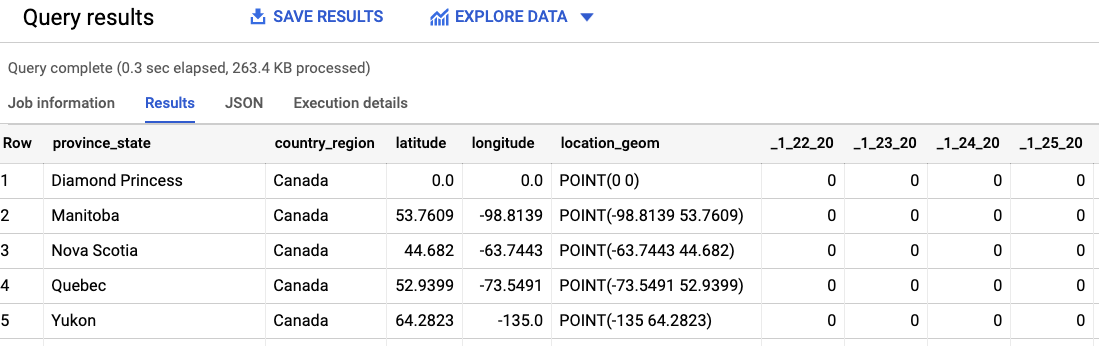
There’s one column for every date. How do we find the last three days for which there is data? Notice the format “_1_22_20, _1_23_20,….”
Finding Columns
We can use INFORMATION_SCHEMA to get the list of columns and find the last three days using:
SELECT
   column_name,
    parse_date('_%m_%d_%y', column_name) AS date
FROM
  `bigquery-public-data`.covid19_jhu_csse.INFORMATION_SCHEMA.COLUMNS
WHERE
    table_name = 'confirmed_cases' AND
    STARTS_WITH(column_name, '_')
ORDER BY date DESC LIMIT 3
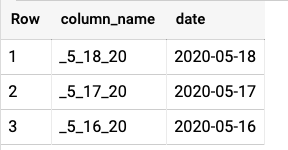
Returning
Building a dynamic SQL statement
You can run a dynamic SQL statement using EXECUTE IMMEDIATE. For example, suppose we have a variable holding the column name _5_18_20; this is how to use it to run a SELECT statement:
DECLARE col_0 STRING;

SET col_0 = '_5_18_20';

EXECUTE IMMEDIATE format("""
  SELECT
     country_region, province_state,
     %s AS cases_day0
  FROM `bigquery-public-data`.covid19_jhu_csse.confirmed_cases
  WHERE country_region LIKE 'Canada'
  ORDER BY cases_day0 DESC
""", col_0);
Look at the query above. First of all, because I’m declaring a variable and so on, this is a BigQuery script in which each statement ends with a semicolon.
I’m using BigQuery’s string format function to build the statement I want to run. Since I’m passing a string, I specify %s in the format string and pass in col_0.
The result comes in two steps:
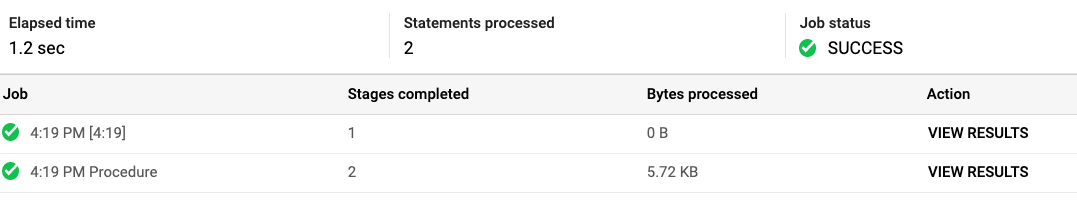
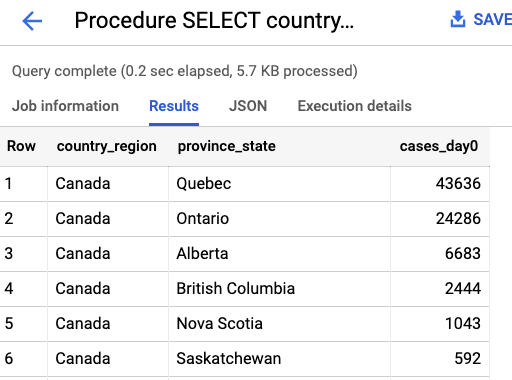
with the result of the second step being:
Scripting the last 3 days
We can combine the three ideas above (INFORMATION_SCHEMA, scripting and EXECUTE IMMEDIATE) to get the data for the last three days.
DECLARE columns ARRAY<STRUCT<column_name STRING, date DATE>>;

SET columns = (
  WITH all_date_columns AS (
    SELECT column_name, parse_date('_%m_%d_%y', column_name) AS date
    FROM `bigquery-public-data`.covid19_jhu_csse.INFORMATION_SCHEMA.COLUMNS
    WHERE table_name = 'confirmed_cases' AND STARTS_WITH(column_name, '_')
  )
  SELECT ARRAY_AGG(STRUCT(column_name, date) ORDER BY date DESC LIMIT 3) AS columns
  FROM all_date_columns
);

EXECUTE IMMEDIATE format("""
  SELECT
     country_region, province_state,
     %s AS cases_day0, '%t' AS date_day0,
     %s AS cases_day1, '%t' AS date_day1,
     %s AS cases_day2, '%t' AS date_day2
  FROM `bigquery-public-data`.covid19_jhu_csse.confirmed_cases
  WHERE country_region LIKE 'Canada'
  ORDER BY cases_day0 DESC
""",
columns[OFFSET(0)].column_name, columns[OFFSET(0)].date,
columns[OFFSET(1)].column_name, columns[OFFSET(1)].date,
columns[OFFSET(2)].column_name, columns[OFFSET(2)].date
);
The steps:
- Declare columns as an array variable that will store the column name and date for the three most recent days
- Set columns to the result of the query that gets the 3 days. Notice that I’m doing an ARRAY_AGG so the full result set is stored in a single variable.
- Format the query. Notice that I’m using
% tto represent a timestamp (see the String format documentation for details) and passing six parameters.
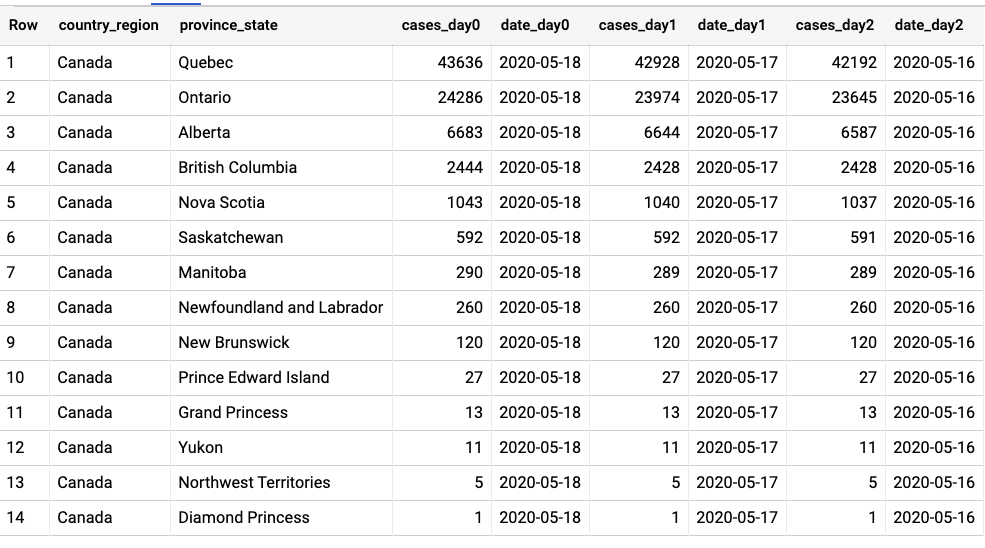
The result looks like this:
Using EXECUTE IMMEDIATE
Instead of using String format, you can run named variables like this:
EXECUTE IMMEDIATE """
  SELECT country_region, province_state, _5_18_20 AS cases
  FROM `bigquery-public-data`.covid19_jhu_csse.confirmed_cases
  WHERE country_region LIKE @country
  ORDER BY cases DESC LIMIT 3
"""

USING 'Canada' AS country;
You can also run positional variables using question marks:
EXECUTE IMMEDIATE """
  SELECT country_region, province_state, _5_18_20 AS cases
  FROM `bigquery-public-data`.covid19_jhu_csse.confirmed_cases
  WHERE country_region LIKE ?
  ORDER BY cases DESC LIMIT ?
"""

USING 'Canada', 3;
The USING clause gets tricky in some situations. For example, the following doesn’t work:
EXECUTE IMMEDIATE """
  SELECT country_region, province_state, ? AS cases
  FROM `bigquery-public-data`.covid19_jhu_csse.confirmed_cases
  WHERE country_region LIKE ?
  ORDER BY cases DESC LIMIT ?
"""

USING '_5_18_20', 'Canada', 3; -- ISSO NÃO FUNCIONA !!!
That’s because the first parameter is interpreted as:
'_5_18_20' AS cases
So you can’t pass a column name through USING. That’s why I recommend using String FORMAT () to build the query to be executed immediately, because it doesn’t have these problems.
The PIVOT() feature is coming soon!!!
Thank you and see you soon!