
Disclaimer: this article reflects my personal experiences and views, not an official position of Microsoft Fabric or Databricks.
Welcome to the second part of our series on integrating two of the most powerful data tools in the Microsoft ecosystem: Microsoft Fabric and Databricks. In Part I, we explored the foundations of this integration and covered the basic concepts. Now, in this Part II, we’re going to dig even deeper.
If you haven’t read the first part yet, I strongly recommend doing so before moving on, since many of the concepts covered here build on what we discussed earlier. Get ready to take your skills and knowledge to a new level and make the most of the combined power of Azure Databricks and Microsoft Fabric.
An effective way to improve an Azure Databricks based architecture is to add a reporting and analytics layer. The traditional Azure Databricks Medallion Lakehouse architecture uses services such as Azure Data Lake Storage (ADLS) Gen2, Azure Data Factory, and Azure Databricks itself for end-to-end management of data ingestion, processing, validation, and enrichment. PowerBI is usually used for reporting and delivering analytical insights.
Expanding this architecture to include Microsoft Fabric can significantly enhance self-service capabilities and improve the experience for business users. Think of Microsoft Fabric as an evolution of PowerBI, offering a new set of features that make data analysis more engaging and efficient.
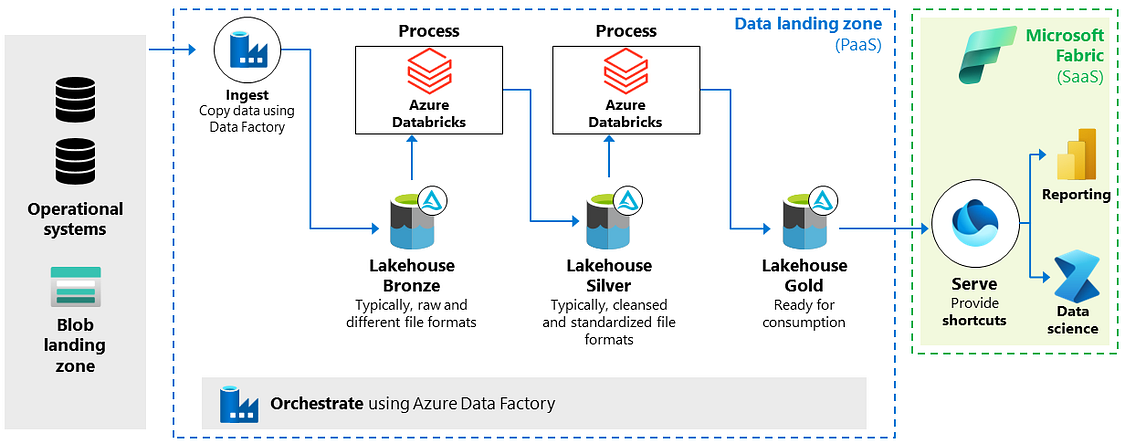
_Reference architecture_
New Microsoft Fabric Features
Microsoft recently introduced the “shortcut” feature in Microsoft Fabric. This feature acts as a lightweight data virtualization mechanism, letting you read data from multiple sources without duplicating it. For example, when using PowerBI, you can access the data directly, without having to copy it or import it into PowerBI.
For Databricks-based architectures, we can use the ADLS Gen2 shortcut feature, since Databricks writes all of its data to ADLS. However, there are a few important considerations:
Fabric Lakehouse: Shortcuts require a Fabric Lakehouse. Make sure to create one if you don’t have it yet.
Delta Lake Format: Shortcuts only work with tables in Delta Lake format.
External Tables: Use shortcuts on external tables whenever possible, instead of tables managed by Databricks.
Folder Limitation: Each shortcut can only reference a single Delta folder. So, to access data from multiple folders, create individual shortcuts for each one.
Read-Only Access: Use a read-only approach to access Delta files in ADLS, avoiding direct manipulation of files in those directories.
Manual Shortcut Creation: Shortcuts can be created manually through the Fabric interface or programmatically using the REST API.
Advanced Integration with Unity Catalog
To make the integration between Databricks and Microsoft Fabric even easier, Microsoft announced exciting developments at the Microsoft Build 2024 Conference. Soon it will be possible to integrate Azure Databricks Unity Catalog with Fabric. From the Fabric portal, you’ll be able to create and configure a new Unity Catalog item, and all managed tables can be upgraded to shortcuts. This integration will dramatically simplify bringing Azure Databricks data together in Fabric, enabling seamless operations across all Fabric workloads.
So, the expanded architecture combining Databricks with Microsoft Fabric is a popular choice among customers who are happy with Databricks. These organizations have already invested significantly in building a Lakehouse with Databricks and plan to keep using it. Microsoft Fabric recognizes the strength and versatility of the Lakehouse approach with the Delta format, allowing an optimized data consumption layer to be added on top. This lets organizations augment their existing Databricks-centric setup with an additional layer specifically designed to make data consumption easier.
That’s all for today! Part III is coming soon, where we’ll look at how, in a Databricks-enabled architecture, we can incorporate a OneLake gold layer. See you then!!