Disclaimer: this article reflects my personal experiences and views, not an official position of Microsoft Fabric or Databricks.
We’ve reached the third part of our series on integrating two of the most powerful data tools in the Microsoft world: Microsoft Fabric and Databricks. In Part I, we explored the foundations of this integration and covered the basic concepts.
If you haven’t read the first and second parts yet, I strongly recommend doing so before moving on, because many of the concepts covered here build on what was discussed earlier. Get ready to take your skills and knowledge to a new level and make the most of the combined power of Azure Databricks and Microsoft Fabric. Here are the links: Part I and Part II
The second architecture shown below modifies the design pattern referenced in the previous article of this series by adding a gold layer in OneLake to the architecture. This is possible thanks to the Azure Blob Filesystem (ABFS) driver in Azure Databricks, which supports both ADLS and OneLake.
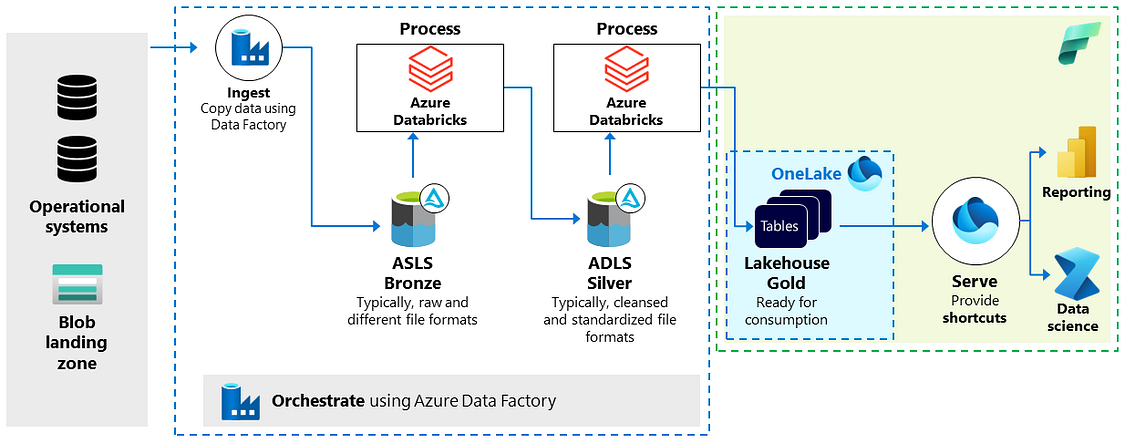
Within this architecture, the workflow and the data processing steps (ingestion, processing, validation and enrichment) remain essentially the same, all managed by Azure Databricks. The main change is that the data for consumption is now more tightly integrated with Microsoft Fabric, because Databricks writes the data to a Gold layer stored in OneLake. You may wonder whether this is a recommended practice and what the benefits are.
It’s crucial to mention that this form of integration is not officially supported by Databricks, which has some implications for data management, covered below.
Databricks distinguishes between two types of tables: managed tables and external tables. Managed tables are created by default and administered by Unity Catalog, which manages their lifecycle and file layout. Manipulating the files of these tables directly with external tools is not recommended. External tables, on the other hand, store data outside the managed storage location specified for the metastore, catalog or schema.
According to the documentation, all tables created by writing directly to OneLake must be classified as external tables, since the data is managed outside the scope of the metastore. As a result, these tables must be administered somewhere else, such as inside Fabric. The motivation for this approach may include:
First, storing data in OneLake can improve performance within Microsoft Fabric. OneLake tables are optimized for performance, especially for queries involving joins and aggregations. By contrast, queries that read data from ADLS Gen2 through shortcuts may perform more slowly.
Second, managing data in OneLake makes it easier to apply security measures within Microsoft Fabric. For example, OneLake tables can be protected with role-based access control (RBAC), simplifying data access management. If ADLS Gen2 were used, you would have to deal with the permissions of the ADLS Gen2 storage account, a more complex task.
Third, OneLake tables can be governed by policies, making compliant use easier. This is an advantage when (externally) sharing tables with domains located elsewhere.
Beyond just reading data, it may be worth considering generating new data within Microsoft Fabric. An upcoming feature may draw attention: soon, Fabric users will be able to access data items, such as lakehouses, through Unity Catalog in Azure Databricks. Although the data stays in OneLake, you’ll be able to access and view its lineage and other metadata directly in Azure Databricks. This improvement will make it easier to read Fabric data from Databricks. For example, if you plan to use Azure Databricks’ Mosaic AI, you’ll be able to do so by reading data from Microsoft Fabric. The likely technology for this is Lakehouse Federation.
In conclusion, the strategy of integrating and processing all data within Databricks, while the consumption layer is managed in Fabric, gives organizations the convenience of using the best features of each application. This approach ensures optimal performance and security when handling data.
See you in the next and final article of the series!!
Subscribe to the newsletter to follow this journey.. See you soon!