
Introduction - Smart Cooperation: The Foundation of Databricks Clusters
Databricks is a robust platform for processing and analyzing large volumes of data, supporting workloads that range from data engineering to data science and business analytics. One of the main components of Databricks is the cluster, a collection of virtual machines configured to run code in parallel, distributed fashion using Apache Spark.
A good way to understand how a cluster works is to compare it to a beehive. Just as a hive is made up of hundreds or thousands of bees working together to keep it productive and organized, a cluster is made up of several nodes (virtual machines) that cooperate to process large volumes of data efficiently.
Traditionally, with All-Purpose Compute, users could create custom clusters by configuring aspects such as the Spark version, the node types (driver and workers), and the number of nodes in the cluster. It was also possible to install additional libraries to support specific workloads, which offered a lot of flexibility. This method was widely used as the default for a long time.
However, Databricks has evolved and now offers new possibilities, including the serverless compute option (Serverless Compute), which brings a more automated and scalable approach to handling varied demands. Just as worker bees can quickly adapt to the needs of the hive, Databricks adapts to workloads with different types of clusters.
Types of Clusters in Databricks
- All-Purpose Compute Clusters
- Jobs Clusters
- Serverless Clusters
- High Concurrency Clusters
- Photon Clusters
A Closer Look at Each Cluster Type
1. All-Purpose Compute Clusters
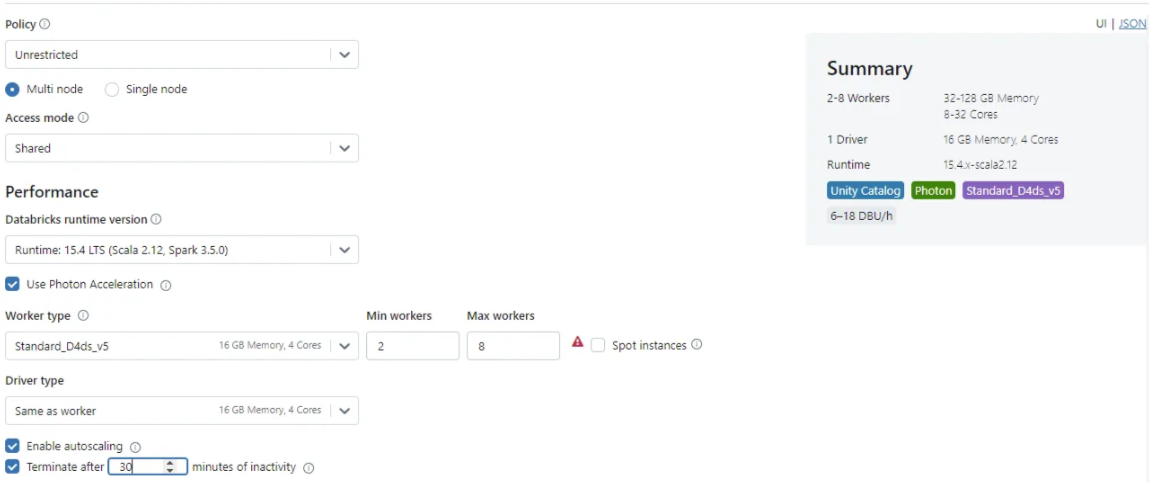
General-purpose (All-Purpose) clusters are designed to be highly configurable, letting users define details such as:
- Apache Spark version
- Instance type (driver and worker nodes)
- Number of nodes in the cluster
In this setup, the driver node acts as the queen bee, coordinating all the activity in the hive, while the worker nodes are the worker bees that carry out the data processing tasks. Efficient communication between them ensures that data is processed quickly and accurately.
_All-Purpose Clusters_
Advantages:
- Full flexibility to customize the environment as needed.
- Allows installing additional libraries to support specific workloads.
Recommended use cases:
- Data development and exploration.
- Running interactive notebooks.
- Work that requires a highly customized environment.
2. Jobs Clusters
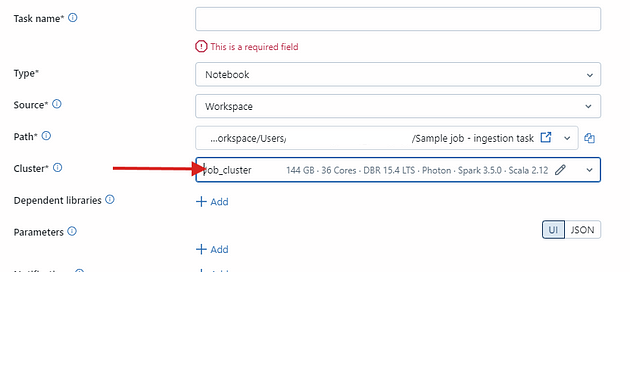
Jobs Clusters are created automatically to run a specific task (“job”) and are terminated as soon as the task finishes.
Just as some bees can be sent on specific missions, like collecting nectar from a distant source, job clusters are created to carry out a one-off task and are then shut down, saving resources.
_Job Clusters_
Advantages:
- Lower costs thanks to automatic creation and termination.
- Quick, simple setup for running scheduled workloads.
Recommended use cases:
- Running scheduled ETL pipelines.
- Batch data processing.
- Running recurring tasks.
3. Serverless Clusters
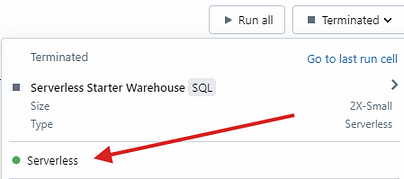
Serverless Clusters remove the need for manual configuration, scaling automatically according to the workload.
Just like in a hive where the number of worker bees can vary depending on the season or the hive’s needs, serverless clusters adjust automatically to demand, ensuring efficiency and avoiding wasted resources.
_Serverless Compute_
Advantages:
- Automatic scaling and simplified management.
- Shorter startup times, improving productivity.
- Ideal for intermittent workloads, since you pay only for actual usage.
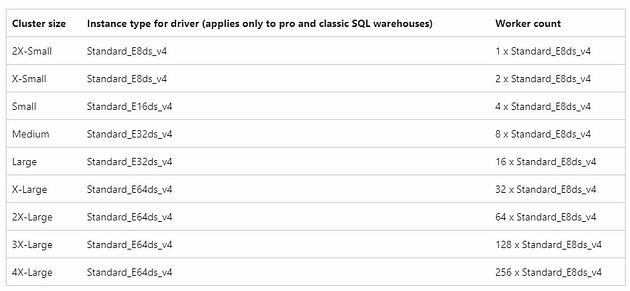
The warehouses used in these clusters can be configured in different sizes, such as Small, Medium, Large, and X-Large, depending on the processing demand. In addition, autoscaling lets the system dynamically adjust the allocated resources to the workload, ensuring optimal performance and cost control.
_Cluster sizes for SQL Warehouses_
Recommended use cases:
- Running ad hoc workloads.
- SQL queries and data processing without complex configuration.
- Real-time data analysis.
4. High Concurrency Clusters
High Concurrency Clusters are designed to serve multiple users at the same time, supporting the parallel execution of multiple tasks.
Just as different bees work simultaneously on various tasks inside the hive, high concurrency clusters let multiple users run their code at the same time without compromising performance.
Advantages:
- Supports multiple concurrent users without significant performance degradation.
- Ideal for collaborative environments.
Recommended use cases:
- Collaborative analysis.
- Interactive dashboards with many concurrent users.
- Business Intelligence platforms integrated with Databricks.
5. Photon Clusters
Photon is a next-generation execution engine designed to significantly improve task performance, especially in typical data warehouse workloads. It is fully compatible with the Apache Spark DataFrame and SQL APIs and has been optimized for operations such as:
- UPDATE
- DELETE
- MERGE
- INSERT
- CREATE TABLE AS
Advantages:
- Significant reduction in task execution time.
- Lower operating cost thanks to improved efficiency.
- Ideal for workloads involving frequent changes to large volumes of data.
Recommended use cases:
- Large-scale data processing.
- Data warehouse workloads that demand high performance.
- Pipelines that run complex data modification operations.
The Cost of Each Cluster Type
- All-Purpose Compute Clusters: They have high costs because the cluster has to stay running during development. They’re recommended only for interactive tasks and development.
- Jobs Clusters: More economical, since they’re created and terminated automatically. The cost is proportional to the tasks’ run time.
- Serverless Clusters: The cost is based on actual usage, making them a highly efficient option for sporadic workloads.
- High Concurrency Clusters: They have an intermediate cost, suited to collaborative environments with many concurrent users.
- Photon Clusters: Although their costs are similar to All-Purpose Clusters, Photon’s improved efficiency can lead to a significant reduction in overall costs, especially for intensive workloads.
Cost Monitoring
To keep costs under control in Databricks, especially when using serverless compute, you can monitor usage by querying the system tables (system.billing.usage), which contain detailed information about users and workloads related to costs.
Alternatively, you can import a billing dashboard directly into the account console. With these tools, you can track serverless costs and usage, getting detailed reports that provide information about:
- SQL costs
- DLT (Delta Live Tables) costs
- Job costs
- Machine learning model costs
These reports give you a comprehensive, detailed view, helping you optimize resource usage and cut unnecessary spending. Below is an example query for this kind of monitoring:
SELECIONE
    t1.workspace_id,
   SOMA(t1.usage_quantity * list_prices.pricing. default ) como list_cost
DE system.billing.usage t1
INNER JOIN system.billing.list_prices em
    t1.cloud = list_prices.cloud e
    t1.sku_name = list_prices.sku_name e
    t1.usage_start_time >= list_prices.price_start_time e
    (t1.usage_end_time <= list_prices.price_end_time ou list_prices.price_end_time é nulo)
ONDE
    t1.sku_name COMO  '%SERVERLESS%'
AGRUPAR  POR
    t1.workspace_id
Conclusion - Efficiency Inspired by Nature: Databricks Clusters in Action
Just like in a beehive, where every member plays a key role in the smooth functioning of the whole, a Databricks cluster is made up of several nodes working together to process large volumes of data efficiently. Databricks offers a variety of cluster options to serve different types of workloads, from development and pipeline execution to collaborative analysis and ad hoc processing. Each cluster type has its own advantages and suits specific scenarios, letting organizations choose the best solution for their needs.
In addition, the ability to monitor costs and usage in detail ensures greater financial and operational control. With these features, Databricks stands out as a scalable, efficient solution for data projects across many market segments.