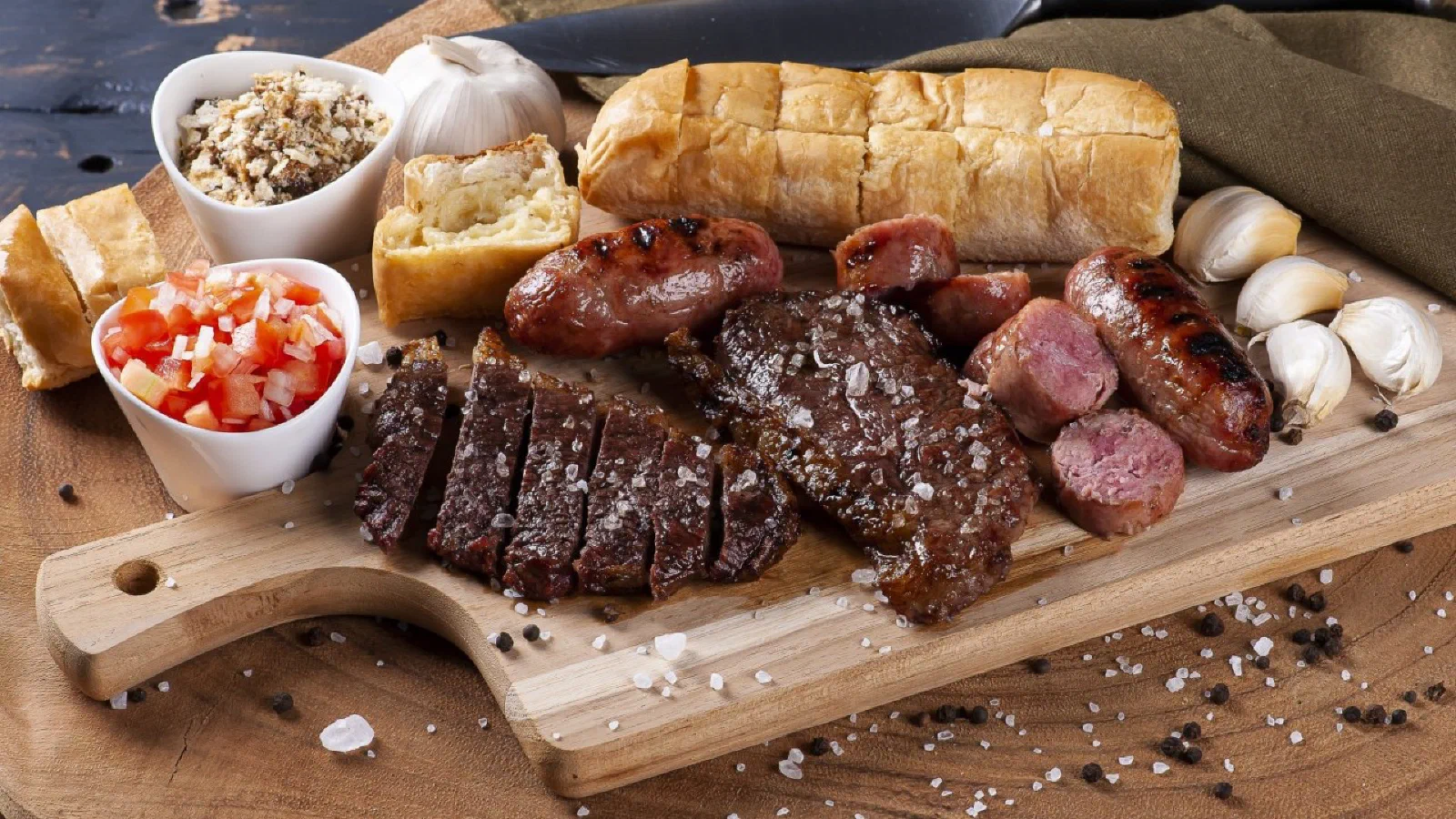
I was thinking about how to explain the Microsoft Fabric SKU Estimator in a simple way, and the age-old art of the Brazilian churrasco came to mind. Yes, because anyone who has ever hosted a barbecue knows there is a very fine line between absolute success and the catastrophe of running out of picanha (the prized top sirloin cap of any Brazilian barbecue).
And, just like at a barbecue, in the data world you also need to get the math right so everything works as expected, without too much left over and without running short when it counts.
First, the challenge: how much to buy?
Hosting a barbecue involves several variables:
- How many people are coming?
- Are there vegetarians in the group?
- How long will the event last?
- Will there be side dishes? Beer?
When estimating resources in Microsoft Fabric, the same thing happens:
- What is the data volume?
- How often is that data accessed?
- Do reports need to be fast, or can they take a few minutes?
- Will there be usage peaks?
The Microsoft Fabric SKU Estimator comes in as that spreadsheet-loving friend at the barbecue who calculates exactly how much of everything you need.
The rookie grill master’s mistake: eyeballing it
Have you ever seen someone buy 2 kg of meat per person? Or worse, buy only sausage thinking “there’s enough for everyone”? Exactly.
Without the estimator, you run the risk of:
- Choosing an oversized SKU (leftover meat and a fridge stuffed for days).
- Or undersizing (guests going home hungry or, in the data world, the system freezing under heavy usage).
The SKU Estimator helps you simulate different scenarios based on your “guests” (workloads), suggesting the ideal SKU that balances performance and cost.
Using the estimator: just like a barbecue calculator
The process is very similar to googling “how many pounds of meat per person?”. Only here, you provide:
- Type of usage (ingestion, transformation, visualization, etc.)
- Number of concurrent users
- Frequency and volume of the workloads
With that, it tells you: “go with this SKU right here, it’s perfect!” Nothing left over, nothing missing, and the data barbecue goes off beautifully.
Scenario 1 – Contoso’s big barbecue: AI-ready analytics
Picture a corporate barbecue at a factory. Contoso Manufacturing called in a systems integrator because their grill (or rather, their analytics architecture) was already outdated.
The current solution that needs to be modernized has the following high-level metrics:
- 50 source systems processed in batch twice a day
- 1,500 entities and tables are part of the ETL pipelines
- An estimated 50 TB of data will be stored on the platform over the next five years
- Platform operations include 4,000 IoT sensors sending telemetry every 10 seconds, with an average telemetry message size of 600 bytes
- There are 10,000 factory workers with daily clock-in events for shift start/end and break in/out, generating 8 data points per worker per day
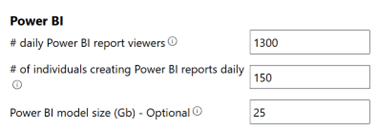
- An estimated 1,300 Power BI dashboard and report users per day
- 150 Power BI report authors
- An estimated maximum semantic model size of 25 GB
After some discovery and design workshops, the systems integrator created the following high-level architecture:
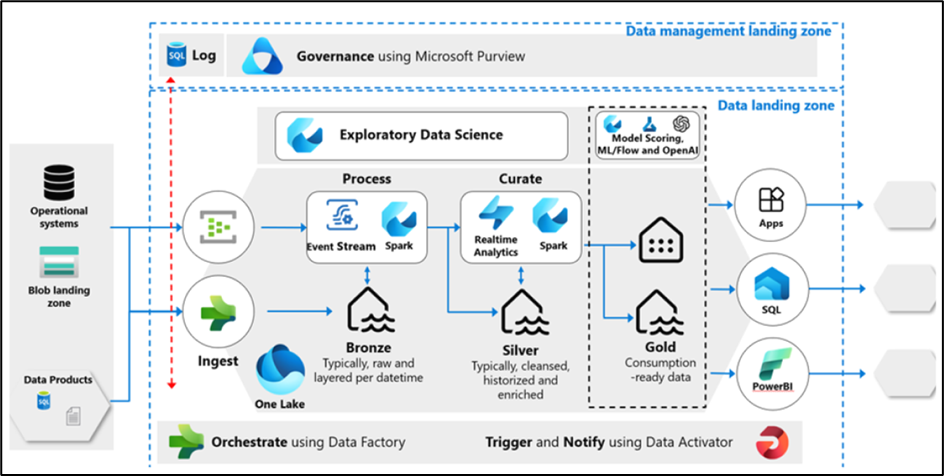
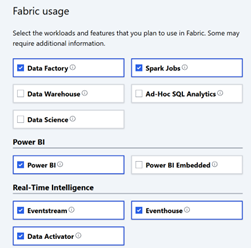
It’s like planning an event with 5 buffets, different grill masters and a digital health inspector. The architect used the SKU Estimator to calculate all of this, selecting the workloads: Spark, Power BI, RealTime Intelligence, Eventstream, Eventhouse and Data Activator.
To simplify this task, we’ll use the Microsoft Fabric SKU Estimator.
To get started, we first need to extract the required high-level inputs and the workload-specific inputs based on the high-level metrics above.
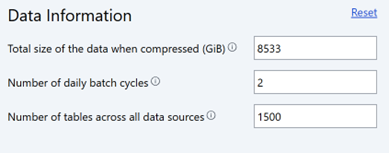
The total data in the architecture is calculated to be approximately 8,533 GB, based on an estimated 6:1 compression ratio. We also infer that the platform will have 2 batch cycles processing 1,500 tables and datasets across all 50 source systems. We enter this information into the SKU Estimator, as shown below:
Next, we select all the workloads that need to be included in the estimate. Six workloads are identified: Data Factory, Spark, Eventstream, RealTime Intelligence, Power BI and Data Activator.
Now we need to complete the workload-specific inputs. In the Data Factory section, enter 0, since the solution does not include Dataflow Gen2:

In the Power BI section, enter the numbers according to the high-level metrics:
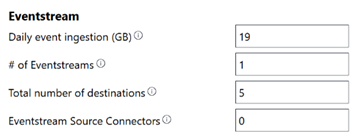
For Eventstream, we extrapolate the telemetry numbers to a daily ingestion size. We do this with the following calculation: (Sensors * events per day) * event message size, which gives a total of ~19 GB.
Then enter the number of eventstreams as 1 and the total number of destinations as 5. This number represents the number of topics that make up the sensor data. For eventstream source connectors, enter 0, since all events are collected from an Azure EventHub and don’t need to be counted.
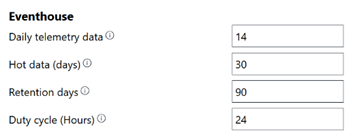
In the Eventhouse section, the daily telemetry data is estimated at 75% of the eventstream data, so it comes to about 14 GB; hot data retention is set to 30 days and total retention to 90 days, and since the platforms run 24×7, a 24-hour duty cycle is entered.
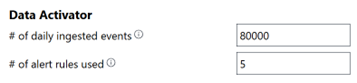
When it comes to Data Activator, we enter the estimated 80,000 events and 5 for the number of alert rules, since there are 5 operational notifications the platforms need to send: excessive shifts, low operator capacity, excess workforce capacity and other proactive notifications.
Once that’s done, click the “Calculate” button and get a viable SKU estimate with a breakdown by workload. We also get an estimate of storage consumption and the number of Power BI Pro licenses that may be needed.
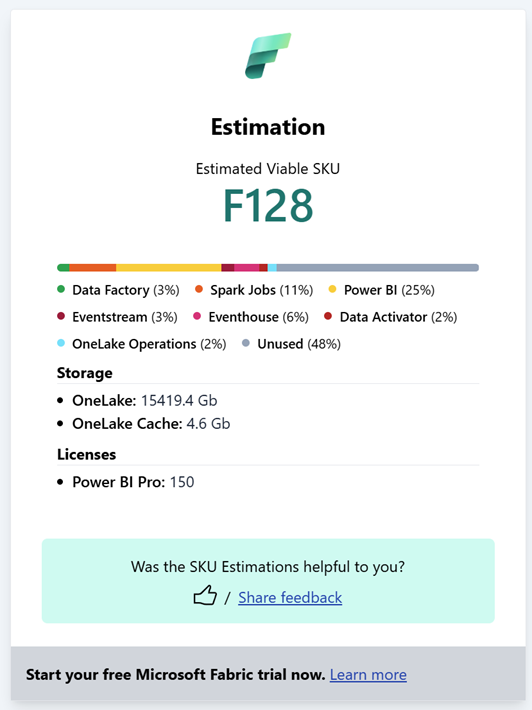
In the end, the estimator delivered the ideal amount of resources, storage and licenses needed. Everything balanced. No leftover sausage, and no grill master sweating for nothing.
Moral of the story: before you buy charcoal, use the Estimator
Just as planning the perfect barbecue saves you headaches, using the SKU Estimator keeps you from wasting money on too many resources or running short on capacity at critical moments.
The Microsoft Fabric SKU Estimator lets you:
- Simulate different volumes and types of usage;
- Calculate the best SKU (the ideal cut for your event);
- Estimate costs and licenses;
- And, of course, make sure your setup can take the heat without wasting resources.
💡 Want to try it? Go to the Microsoft Fabric SKU Estimator and make sure your data barbecue never runs out of meat (or performance).
If you liked the analogy, share it with that friend who always overdoes the picanha or the cluster size 😄. See you next time!