
Imagine you’ve hired the most talented driver in Formula 1. He’s fast, intuitive, and can get the most out of any car. But when he gets to the starting grid, the vehicle you handed him is a prototype with no ABS brakes, no telemetry, and no safety system. He might manage a few laps, but he’s not going to finish the race.
That’s exactly the scenario most companies are living through today with vibe coding. AI code generation tools, such as Replit, Cursor, and GitHub Copilot, are exceptional drivers. In minutes, they deliver working applications, good-looking interfaces, and reasonable business logic. The problem starts when that application needs to go into enterprise production: where does the data live? Who can access what? How do you make sure sensitive information is protected? How do you connect it to the company’s analytics ecosystem?
Rayfin is the engineering crew that was missing. Announced by Microsoft at Build 2026, it’s an open-source Backend-as-a-Service (BaaS) built specifically for Microsoft Fabric . It doesn’t just generate your application’s backend; it makes sure that backend is born already integrated with governance, security, and enterprise data.
The Real Problem: The Gap Between Prototype and Production
Before understanding Rayfin, you need to understand the problem it solves, because it’s more serious than it looks.
When a business team or a developer uses vibe coding to build an application, the typical result is a working frontend connected to a makeshift database (often a Supabase or Firebase instance set up in a hurry). That works for a demo. But when the company decides to put that system into production, tough questions come up:
Is this application’s data in OneLake or in a separate silo? Can the analytics team access this information to build reports in Power BI? Do the Purview privacy policies apply to this data? If an employee is let go, is their access revoked automatically through Entra ID?
In most cases, the answer to all of these questions is “no.” The result is that the prototype sits idle, waiting for months of engineering work to be adapted to the corporate environment, or it’s simply abandoned.
Rayfin closes that gap. It makes the application enterprise-ready from birth, without requiring the developer (or the AI agent) to understand all the complexity of the corporate infrastructure.
What Rayfin Does in Practice
Rayfin takes a “code-first” approach: you define your application’s structure using TypeScript decorators, and it automatically generates everything underneath.
When you run the npx rayfin up command, Rayfin:
- Creates the database with the correct schema
- Generates the CRUD APIs automatically
- Configures authentication through Microsoft Entra ID
- Deploys the application as a native Fabric artifact
- Makes sure the data lands directly in OneLake
There’s no need to configure servers, write database migration scripts, or manually integrate with the company’s identity system. All of it happens from the data model definition in TypeScript.
A Real Example: A Work Order System for Field Technicians
To make this concrete, let’s use a real use case: a telecommunications company that needs an app for its field technicians to manage work orders.
The scenario without Rayfin:
The IT team gets the request and uses vibe coding to build the React frontend in two days. But that’s where the problem starts. They need to set up a database, choose between PostgreSQL and MySQL, write the migrations, configure authentication, build the APIs, make sure only authorized technicians see the orders for their region, and then still build an ETL pipeline to get that data into Power BI so the manager can track the team’s productivity. That takes weeks.
The scenario with Rayfin:
The developer (or the AI agent) defines the system’s entities in TypeScript:
import { entity, role, text, uuid, date, boolean, set, one } from '@microsoft/rayfin-core';
import { Customer } from './Customer.js';
import { Region } from './Region.js';
import { UserProfile } from './UserProfile.js';

export type JobStatus =
  | 'new'
  | 'scheduled'
  | 'in-progress'
  | 'blocked'
  | 'complete';

@entity()
@role('authenticated', '*')
export class Job {
  @uuid() id!: string;
  @text() title!: string;
  @text({ optional: true }) description?: string;

  @set('new', 'scheduled', 'in-progress', 'blocked', 'complete')
  status!: JobStatus;

  @date({ optional: true }) scheduledAt?: Date;
  @date() createdAt!: Date;
  @date() updatedAt!: Date;

  @boolean({ default: false }) isOnSite!: boolean;
  @boolean({ default: false }) needsHelp!: boolean;

  @one(() => Customer) customer!: Customer;
  @one(() => Region) region!: Region;
  @one(() => UserProfile, { optional: true }) technician?: UserProfile;
}
With that code, Rayfin understands there’s a Job entity with a typed status, relationships with Customer, Region, and UserProfile, and that only authenticated users can access it. It generates the database, the APIs, and the security configuration automatically.
When the technician logs a work order in the app, that data lands directly in OneLake. At that same moment, the regional manager can see in Power BI how many orders are open, which technician has the heaviest workload, and which regions have the most blocked tickets. No ETL, no pipeline, no waiting.
Why This Is Different from Supabase, Firebase, and the Like
This is a comparison worth making carefully, because Rayfin isn’t exactly competing with those tools; it’s solving a different problem.
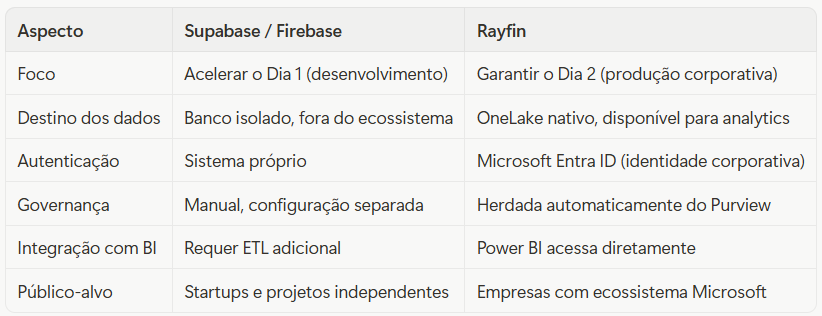
Supabase is excellent for someone building a product from scratch. Rayfin is for someone building inside an organization that already has data, policies, and an established Microsoft ecosystem.
The Engineering Crew: The SDK Packages
Rayfin is made up of a set of packages that work together, like the different specialists on an F1 team:
- @microsoft/rayfin-core: the chassis. It defines the TypeScript decorators that describe the data model.
- @microsoft/rayfin-cli: the chief mechanic. It interprets the model and orchestrates the deployment to Fabric.
- @microsoft/rayfin-client: the co-driver. It generates the TypeScript client for the frontend to consume the generated APIs.
- @microsoft/rayfin-testing: the simulator. It lets you test the application logic locally before deploying.
Each package has a clear responsibility. The developer (or the AI agent) only needs to interact directly with rayfin-core to define the model. The rest happens behind the scenes.
The Impact on Data Teams
For people who work with data, Rayfin represents an important paradigm shift. Historically, there’s been a clear divide between “operational systems” (where data is generated) and “analytical systems” (where data is analyzed). That divide creates latency, ETL costs, and, frequently, inconsistencies between what the system shows and what the report presents.
With Rayfin, that divide starts to disappear for applications built in the Fabric ecosystem. The data is born in OneLake, governed by Purview, immediately available for analytics. The application and the data warehouse share the same source of truth.
That doesn’t solve all of a company’s data integration problems. Legacy systems still exist and still need pipelines. But for new applications built with vibe coding or by AI agents, Rayfin makes sure they enter the race with the right engineering already in place.
Conclusion
Vibe coding is here to stay. The ability to generate working applications in minutes using AI is a real transformation in how software gets built. The challenge has always been making sure that software reaches enterprise production without compromising security, governance, and data integration.
Rayfin is Microsoft’s answer to that challenge. It doesn’t make development slower; it makes the road to production shorter, because it eliminates the weeks of infrastructure work that usually sit between the prototype and the system in real use.
The talented driver finally has the car he deserves.
References:
- Official repository: github.com/microsoft/rayfin
- Community templates: github.com/microsoft/awesome-rayfin
- Official announcement at Build 2026: community.fabric.microsoft.com