
Introduction
Imagine being able to talk to your data as if you were chatting with a coworker or, better yet, as if you were dealing with the genie of a magic lamp. That’s exactly what AI/BI Genie makes possible! Just like the legendary genie who grants wishes, Genie makes life easier for business users, letting them “rub the lamp” of their data to get answers and insights through natural language, the same way we speak every day.
Genie is an innovative solution built by Databricks to make data access and analysis magically simple, through natural language interactions. Launched in 2024, AI/BI Genie is part of Databricks’ advances in generative artificial intelligence (GenAI) applied to data analysis. Like Aladdin’s genie, it’s here to democratize the use of data, letting anyone in the organization ask complex questions without writing a single line of code.
The secret behind Genie is Unity Catalog, which works as the magic “map” for understanding the structure of your data. That includes everything from where the data comes from (lineage), through documentation, to the history of queries already run. With that information, Genie can answer a wide variety of business questions quickly and reliably.
Just like in the classic story, the Databricks Genie has no limit on wishes. It combines the simplicity of natural language with the reliability of generative artificial intelligence (GenAI), making access to data and to artificial intelligence more democratic than ever, all under the unified governance of the Databricks Data Intelligence Platform.
Setting up and using AI/BI Genie
Genie spaces are prepared by data analysts to ensure a smoother, more accurate experience. The process starts with selecting specific tables from Unity Catalog, focusing on a data set that makes sense for the organization. Next, the analysts expose the metadata of those tables and add instructions carrying business-specific information, such as business rules and concepts that matter in the user’s context. To make things even easier, the analysts also add sample questions and answers, helping business users take their first steps in a guided, safe way.
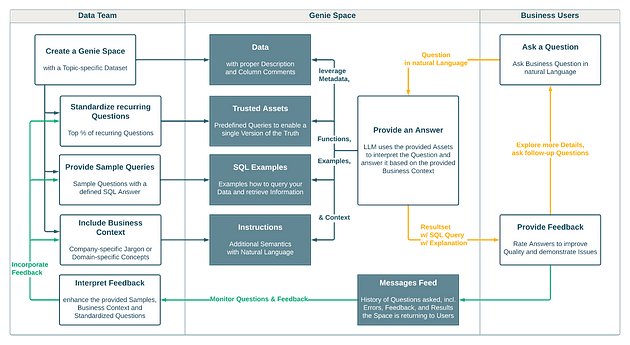
_Flow for creating and using Genie spaces_
In the image above, you can see the flow for creating and using Genie spaces, divided into three main parts: the data team, the Genie space and the business users. It illustrates the whole cycle, from the data team setting up the space to the end users’ interactions, highlighting the feedback loop and the use of natural language for questions and answers. This flow shows how Genie is fed by trusted data and practical examples, all designed to deliver insights in a simple, accessible way.
Continuing the explanation, below are the best practices for creating and using Genie spaces, listed and explained to guide the ideal setup of this analytics environment.
Choosing the data sets
To start using Genie efficiently, it’s best to work with a small set of tables (between 5 and 10), with a limited number of columns (fewer than 50), focused on a single topic. But why start this way? Because the more coherent and semantically connected your data set is, the better Genie performs.
What does a coherent, semantically connected data set mean? It means the relationships between tables should reflect real connections or logical associations. For example, the tables should be clearly related, as they are in a real-world database, and have primary key and foreign key constraints, so Genie understands how the tables are connected and can perform joins correctly.
Every table and column should contribute to the overall topic of the data set. If there are columns that aren’t aligned with the purpose of the set, it’s important to create views to clean up the data and make it more coherent and organized.
In general, the data used in Genie spaces comes from business-level tables in the gold layer, similar to the data you’d use in a BI tool to build dashboards. This is often done with a Kimball-style star schema, a multidimensional model that makes data easier to understand and analyze.
Finally, make sure every user who interacts with the Genie space has, at a minimum, SELECT privileges on the data being used. Since data access is governed by Unity Catalog, missing privileges will result in error messages for users.
Clear Documentation, Accurate Answers: Setting AI/BI Genie Up for Success
For Genie to work effectively, it’s essential that your data is well documented and annotated. Documentation is fundamental because it brings business context to the data, making it easier to understand and avoiding misinterpretation, both by users and by Genie itself. Put simply: the clearer and more detailed your annotations, the better the answers Genie can give.
You can use artificial intelligence tools to generate part of this documentation automatically, saving time and reducing manual work. Even so, it’s important to review and adjust the descriptions so they match the specific use case and your domain knowledge. Well-written documentation doesn’t just make things easier to use; it also ensures Genie’s answers are more accurate and relevant to your business goals.
From Natural Language to SQL: How to Prepare Genie for Efficient Queries
While preparing the Genie space, it’s essential to test it to check the quality of the answers and make sure it’s delivering the expected results. That includes rephrasing the sample questions and adjusting the instructions until Genie provides the correct, desired answers.
Genie converts natural language questions into SQL, which means it needs a SQL warehouse to run the queries. For best results, we recommend a serverless SQL warehouse, since it offers faster startup times and intelligent workload management, letting queries be processed quickly and cost-effectively.
Remember that users who interact with the space need “CAN USE” access to the designated SQL warehouse, so they can run queries without any problems.
Improving answer quality
To improve the quality of Genie’s answers, it’s essential to turn all the business context you have about the data into information Genie can use effectively. Today there are three ways to do this:
- Instructions: Add extra semantics in natural language so Genie better understands the concepts and relationships specific to your business.
- SQL examples: Provide sample SQL queries that guide Genie on how to query your data and get the right information. This helps align the answers with what you expect in terms of business logic.
- Trusted Assets: Create predefined queries that establish a “single version of the truth”, ensuring results are consistent and reliable across every interaction.
These practices don’t just increase answer accuracy; they also keep Genie aligned with business goals, delivering more relevant results to users.
Example: transfer your business language to Genie
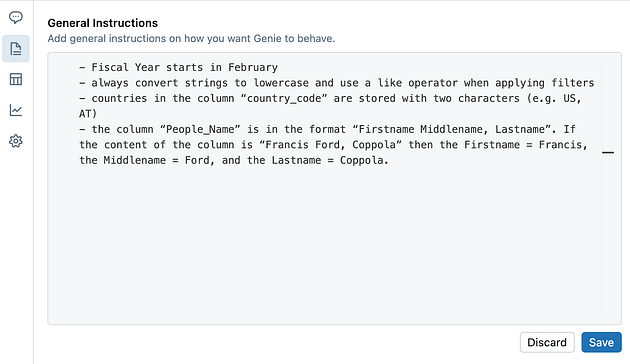
Instructions let you provide additional information to help Genie understand your business’s specific language. They guide the language model to pick up company jargon or concepts specific to a given domain.
For example, at Databricks our fiscal year starts in February, unlike most companies, where it starts in January. So this detail needs to be added as an instruction for Genie, ensuring it aggregates the numbers correctly:
- The fiscal year starts in February.
Another option is to instruct Genie on how to apply filter logic or look up values in columns, especially when some of them are case-sensitive:
- Always convert strings to lowercase and use the “like” operator when applying filters.
- Countries in the “country_code” column are stored as two characters (e.g., US, AT).
You can also use “one-shot learning” techniques to teach Genie how to handle specific columns and extract information from them:
- The “People_Name” column is in the format “FirstName MiddleName, LastName”. If the column content is “Francis Ford, Coppola”, then FirstName = Francis, MiddleName = Ford, and LastName = Coppola.
Make sure your instructions are clear and to the point. The same goes for the data: the more coherent and simple the instructions, the better the results Genie delivers.
Trusted Assets: predefined queries for specific questions
To better understand the difference between Trusted Assets and SQL Examples, let’s use a simple analogy: imagine you’re teaching a student to solve multiplication problems.
First, you teach basic multiplication, like 2 * 3, which they usually memorize. Later, you teach tools for solving more complex multiplication, like 123*64. The student tends to memorize recurring multiplications, like 8 * 8 = 64, but also learns the tools to work out more complex ones independently.
Trusted Assets are user-defined queries that run for specific questions. Genie runs the predefined query and returns the result with a “trusted asset” label. The association between Trusted Assets and specific questions is made through function comments. In our analogy, this would be like memorizing the result of 8 * 8 without having to redo the calculation.
1. Create a Trusted Asset
Here’s another example: suppose you need to convert beer prices from euros (EUR) to US dollars (USD). You can create a predefined query that performs this conversion and associate it with a specific question, ensuring Genie always gives the right answer with the “trusted asset” seal, without recalculating every time.
SELECT
 o.year,
 o.beer_price,
 (o.beer_price * e.EUR2USD) AS beer_price_usd
FROM
 main.default.oktoberfest_gold o
 JOIN main.default.eur_usd_conversion e ON o.year = e.Year
WHERE
 o.year = 2005
These Trusted Assets ensure consistency and accuracy in the answers to recurring questions, saving time and giving users greater reliability.
2. Register the generalized query (adding the filter as a parameter) as a Function
To make the query more flexible and adaptable to different scenarios, you can register it as a SQL function, letting the filters be passed as parameters. This makes it easy to reuse the query in many situations while keeping the result consistent and reliable.
Let’s use the example of converting beer prices from euros to dollars, but now with a filter as a parameter. That way, the user can choose to filter by a specific type of beer, for example:
CREATE OR REPLACE FUNCTION convert_beer_price_to_usd(beer_filter STRING) RETURNS TABLE<beer_name STRING, price_eur DECIMAL(10,2), price_usd DECIMAL(10,2)> AS SELECT beer_name, price_eur, (price_eur * exchange_rate_usd) AS price_usd FROM beer_prices WHERE beer_name LIKE CONCAT('%', beer_filter, '%');
In this example, the convert_beer_price_to_usd function accepts a parameter called beer_filter, which can be used to look up specific beers in the beer_name column. That way, Genie can run the query adjusted to the filter provided by the user, making the process more dynamic and efficient.
The Trusted Assets associated with this function will let Genie provide more accurate and faster answers to specific questions about beer prices, keeping the answers consistent.
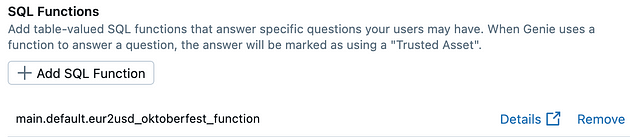
3. Add the registered function as a Trusted Asset
To make the beer price conversion function a Trusted Asset in Genie, you need to register it as one. This ensures Genie can use the function to answer specific questions quickly and consistently, flagging the result with the “Trusted Asset” seal.
4. Retrieve trusted results for questions
After adding the beer price conversion function as a Trusted Asset, you can use Genie to retrieve the trusted results when a specific question is asked. This ensures Genie will use the predefined query, returning accurate results labeled as “trusted”.
For example, when you ask a question like:
“What is the price of Guinness beer converted to USD?”
Genie will automatically trigger the Trusted Asset associated with the question, running the convert_beer_price_to_usd function with the appropriate parameter:
SELECT * FROM convert_beer_price_to_usd('Guinness');
The result will be a table that includes the beer name, the original price in euros and the price converted to US dollars:

Genie will indicate that this is a result from a Trusted Asset, showing the corresponding label to the user. This not only provides the right answer but also reinforces the reliability of the information, ensuring it’s based on a previously validated query.
This approach lets users get faster, more accurate answers, since Genie doesn’t need to build a new query from scratch every time, taking advantage of the logic already established in the function registered as a Trusted Asset.
Conclusion
Genie stands out for its ability to replace complex, dashboard-specific queries, offering a more interactive and flexible solution for business users. While traditional dashboards are useful for tracking the main KPIs and answering standard questions, they can become limiting when it comes to exploring deeper, more detailed questions. To meet that need, Genie offers a faster, more effective approach, letting users ask more complex questions, all based on the same semantic data, enriched by Trusted Assets and the right instructions.
Adopting this strategy not only frees up the data team’s time but also empowers business users to get more complete insights, increasing autonomy and analytical power within the organization. In short, dashboards are best suited for the 10% of recurring day-to-day questions, while Genie is ideal for digging into more complex questions that dashboards can’t answer.
To ensure the success of an AI/BI Genie space, it’s essential to follow a few key components:
- Data: use a clean, coherent, well-documented data set specific to the topic, ensuring accurate and clear information.
- Instructions: convey your business-specific information clearly, using natural language to guide Genie.
- Predefined Queries: use Trusted Assets to establish a single source of truth and use SQL examples to guide Genie’s answers, improving accuracy for common questions.
- Feedback: monitor the questions and their ratings, adjusting the Genie space based on user comments and the examples provided.
By following these components, you’ll be able to optimize your use of Genie, boosting insights and making data analysis more complete and effective.
References
https://docs.databricks.com/en/genie/index.html
https://www.databricks.com/glossary/medallion-architecture
https://www.databricks.com/glossary/star-schema
https://www.databricks.com/blog/onboarding-your-new-aibi-genie