Introduction: The Real-Time Data Factory
Picture a modern production line where products are manufactured in real time, without interruption. Now swap the products for data, and you’ll have an idea of what data streaming is. Welcome to the factory of the future, where data is processed 24/7, with no coffee breaks!
To understand the concept better, let’s use a simple analogy: think of data streaming as a river of information that flows constantly. Unlike a lake (which represents batch processing), this river is always moving, bringing something new every second. In this river, each drop is a piece of data: a click on a website, a bank transaction, a sensor reading or a social media post. What makes this river special is its ability to carry information instantly, letting companies and organizations make decisions in real time.
But how does it work in practice? Imagine you own a chain of retail stores. With data streaming, you can know instantly when a product is about to sell out, what customers prefer in different regions, or even spot buying patterns before they become obvious. It’s like having a business intelligence superpower that works 24 hours a day, 7 days a week, without ever needing to sleep or take a coffee break. This ability to process and analyze data in real time is changing the way companies in every industry make strategic decisions.
What is Streaming?
Data streaming is like our nonstop production line. Unlike batch processing, where large volumes of data are processed at scheduled intervals, streaming handles continuous flows of data in real time.
The main difference is latency:
- Batch: Minutes, hours or days
- Streaming: Milliseconds or seconds
The image below illustrates the Lambda architecture, a data processing model that combines batch and real-time (streaming) processing to handle large volumes of data. The architecture is divided into three main layers:
- Speed Layer: Processes data in real time using streaming technologies such as Spark Streaming, Storm or Flink. It produces incremental views of the data.
- Batch Layer: Stores all the raw data and processes it periodically to create precomputed views.
- Serving Layer: Combines the results of the speed and batch layers to answer queries.
The data sources on the left include various origins such as NoSQL, IoT, web logs, ERP and legacy systems. This data feeds both the speed layer and the batch layer. The data flow goes through batch and real-time processing, creating views that are combined in the serving layer. This enables efficient queries using technologies such as Spark SQL, Pig, Hive, etc.
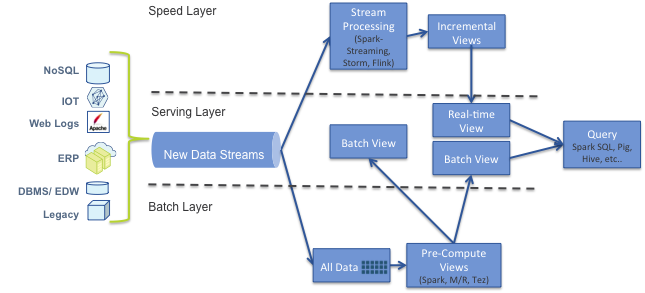
_Lambda Architecture_
Why does Streaming matter?
Streaming is crucial for use cases that demand immediate insights:
- Fraud detection in financial transactions
- Real-time monitoring of industrial equipment
- Personalization of user experiences in apps
- Sentiment analysis on social networks
In our data factory, the conveyor belts are the information flows, constantly bringing in new “products” (read: data) to be processed. This data can come from various “suppliers”, such as IoT sensors (our electronics branch), financial transactions (the accounting department) or even social networks (the corporate gossip office).
The Microsoft Fabric Assembly Line
What is Microsoft Fabric?
Microsoft Fabric is a unified data analytics platform that combines several services into a single environment. It’s like having a multipurpose factory that can produce any kind of insight you need. Its main advantages include:
- Unified platform: Reduces integration costs
- Scalability: Supports large-scale data processing
- AI integration: Incorporates machine learning tools
- Friendly interface: Accessible to a wide range of users
Microsoft Fabric is like a super-advanced assembly line, designed to handle this nonstop production of data. Let’s meet the workstations on this line:
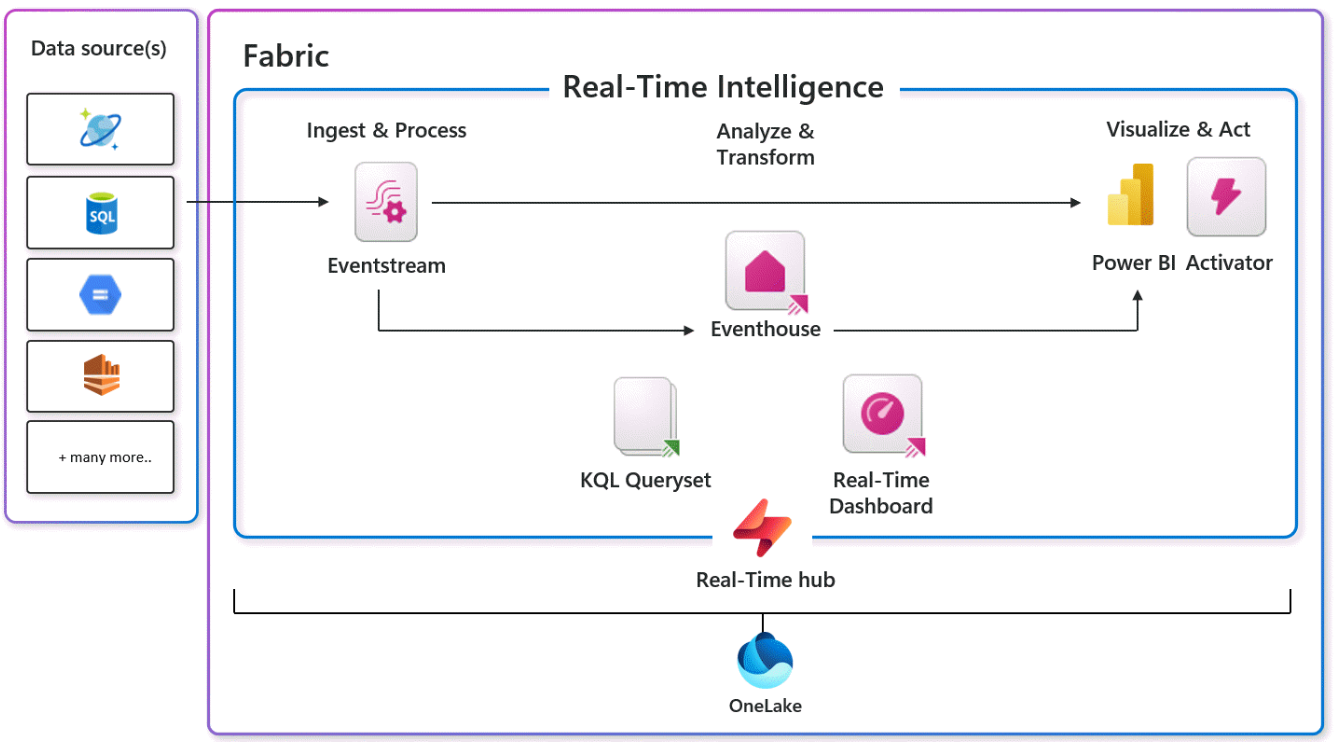
EventHouse: This is our raw materials warehouse. Raw data arrives here and is organized for processing.
KQL Queryset: Think of it as the factory’s quality engineer. It examines the data, asks complex questions and makes sure everything is in order.
Real-time Dashboard: This is the factory’s control room. Here, managers can see in real time how insight production is going.
Eventstream: This is our factory’s conveyor system. It moves data from one station to another, making sure everything flows without interruption.
Activator: Think of it as the factory’s alarm system. When something important happens, it fires an alert so the team can act quickly.
How does Microsoft Fabric handle Streaming?
Fabric uses the Lambda architecture to process streaming data:
- Speed layer: Event Stream Service
- Batch layer: Pipelines, dataflows and notebooks
- Serving layer: Connects to different data stores
Integration with Power BI and Real-Time Dashboards
Fabric integrates seamlessly with Power BI, enabling real-time dashboards for instant visualization of insights.
Connectivity with other tools
Fabric offers connectivity with Azure, Databricks, Kafka and other tools, making it easy to integrate with existing ecosystems.
Hands On: Building Your Insight Production Line
Let’s build a complete production line to monitor bike rentals in real time, taking advantage of the latest Microsoft Fabric updates.
Step 1: Set up the EventHouse
- In the Microsoft Fabric portal, click “Create” and select “Eventhouse”.
- Name your Eventhouse “BikeRentalEventhouse”.
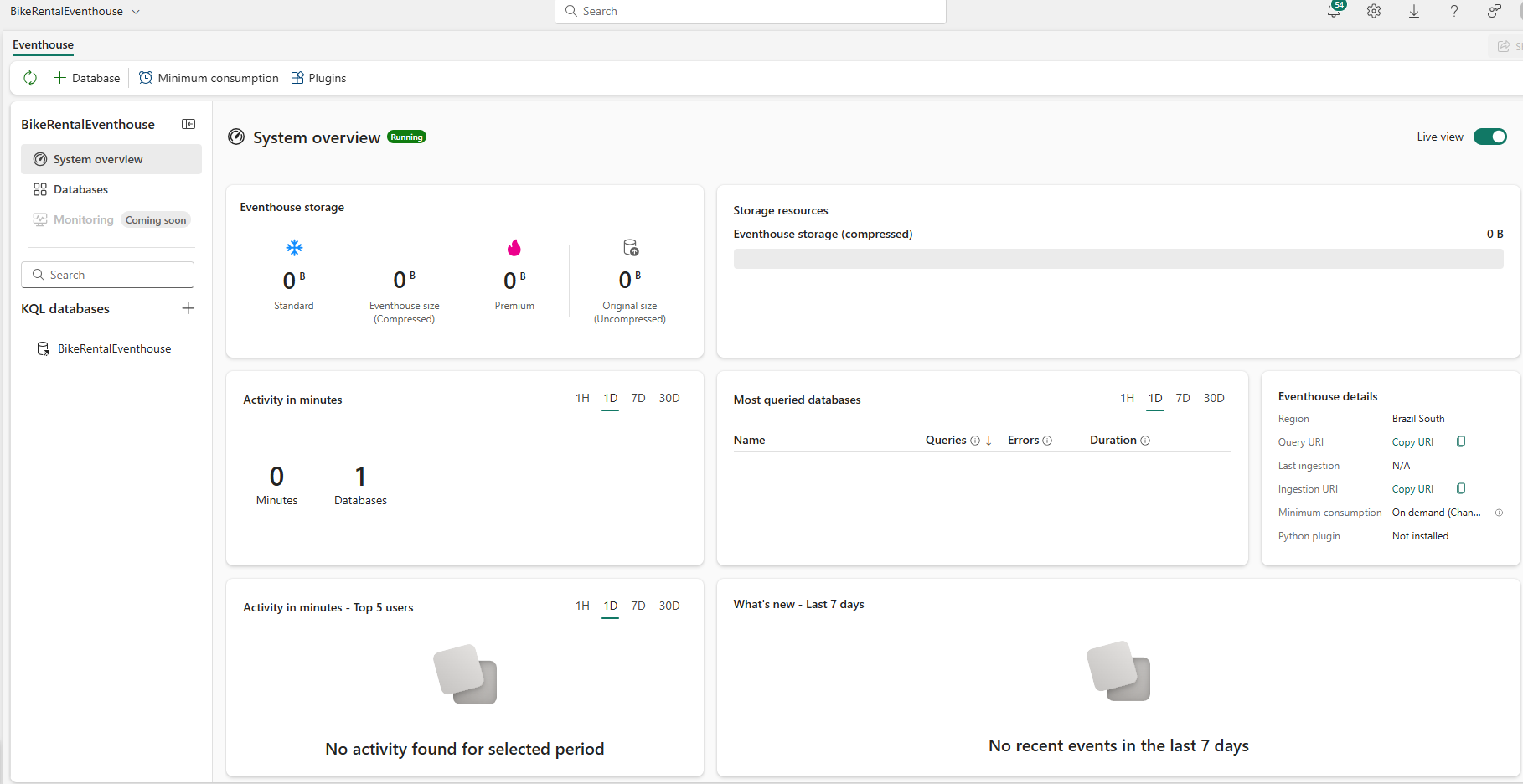
_Creating the Eventhouse_
Step 2: Set up the Eventstream
- In the Microsoft Fabric portal, create a new Eventstream called “BicycleRentalStream”.
- As the data source, select Microsoft’s “Bicycles” sample dataset.
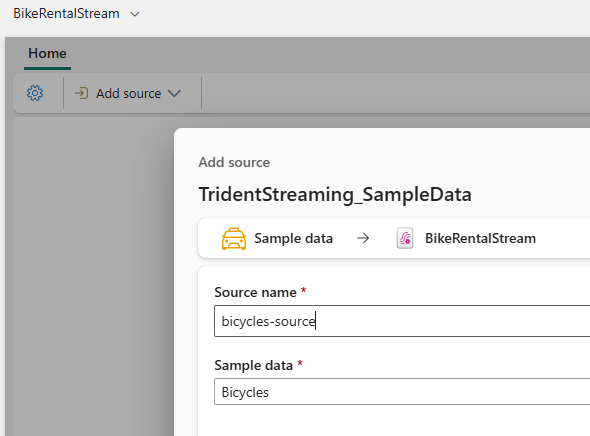
_EventStream Add source_
- Configure the Eventstream to process data in real time, simulating the continuous flow of bike rental information.
- Define transformations to extract relevant information, such as:Number of bikes rented per hourLocation of the most popular bikesAverage rental duration
- Set the destination of the processed data to the EventHouse you created earlier.
- Adjust the processing settings to simulate a real-time scenario, with frequent updates.
- Test the data flow using the preview feature to make sure the “Bicycles” sample data is being processed correctly.
- Activate the EventStream to start continuous processing of the bike rental data.
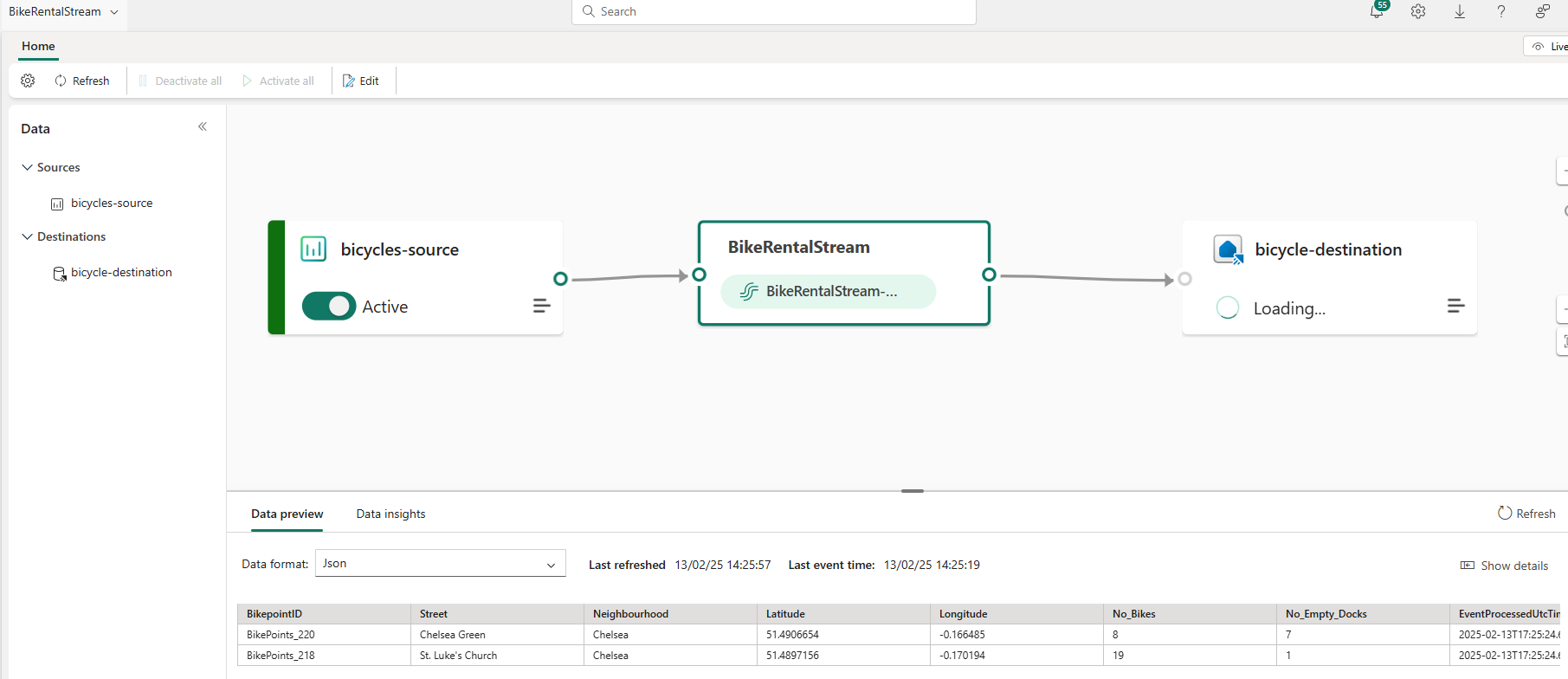
_Bicycles EventStream ready_
Step 3: Create a KQL Queryset
- In the Eventhouse, create a new KQL Queryset called “BikeRentalQueries”.
- Write a query to analyze data in real time:
   bikes
   | where ingestion_time() > ago(5m)
   | summarize AvgBikes = avg(No_Bikes), AvgEmptyDocks = avg(No_Empty_Docks) by Neighbourhood
   | order by AvgBikes desc
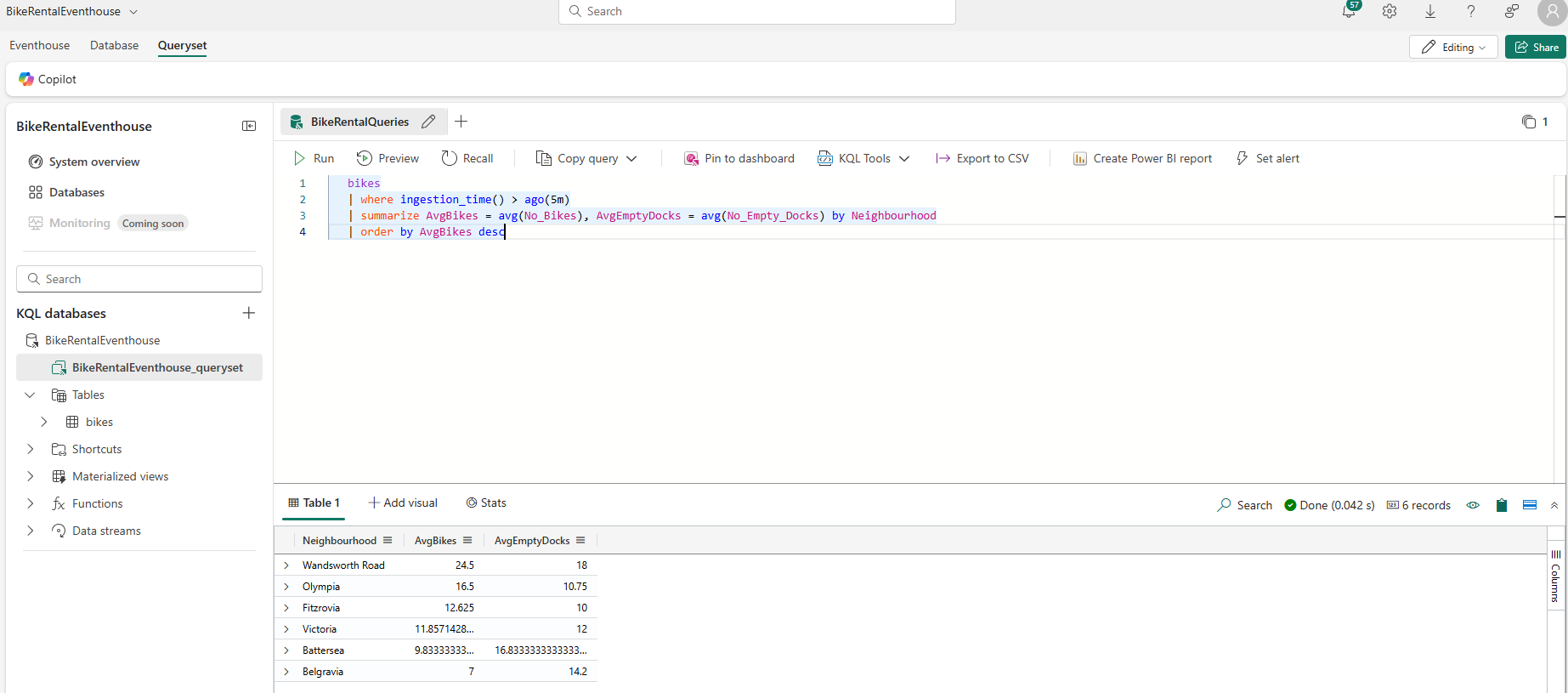
_Running the KQL query_
Step 4: Create a Real-time Dashboard
- Create a new Real-Time Dashboard called “BikeRentalDashboard”.
- Add tiles using the query from the KQL Queryset.
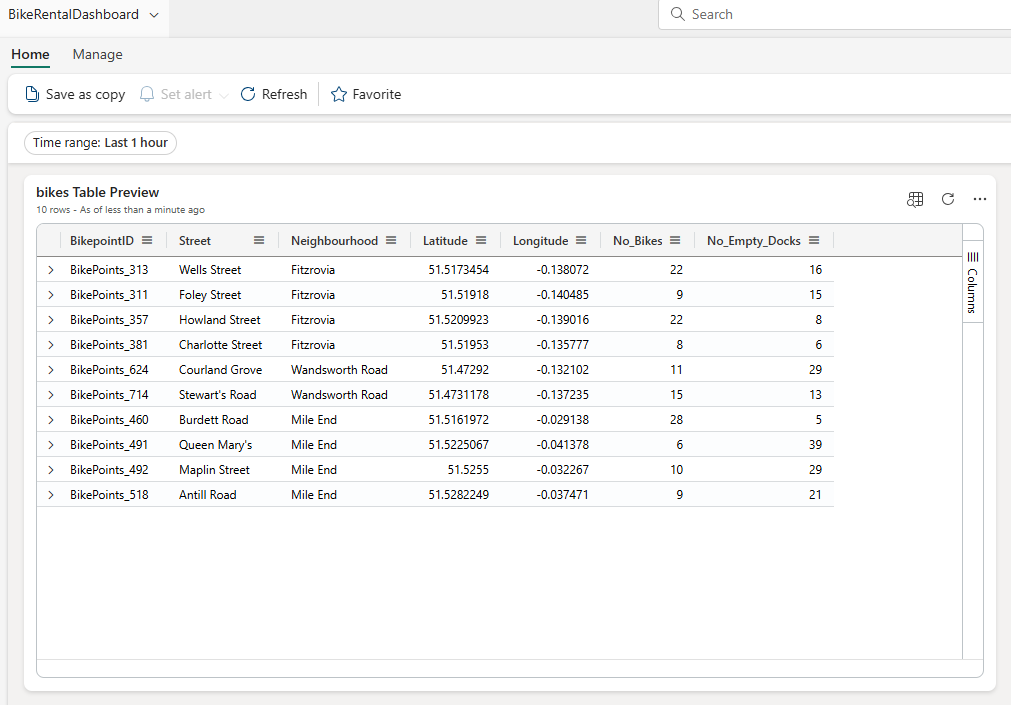
_Real-time dashboard_
Step 5: Set up the Activator
- Create a new Activator called “BikeRentalAlert”.
- Configure alerts based on the “BicycleRentalStream” EventStream.
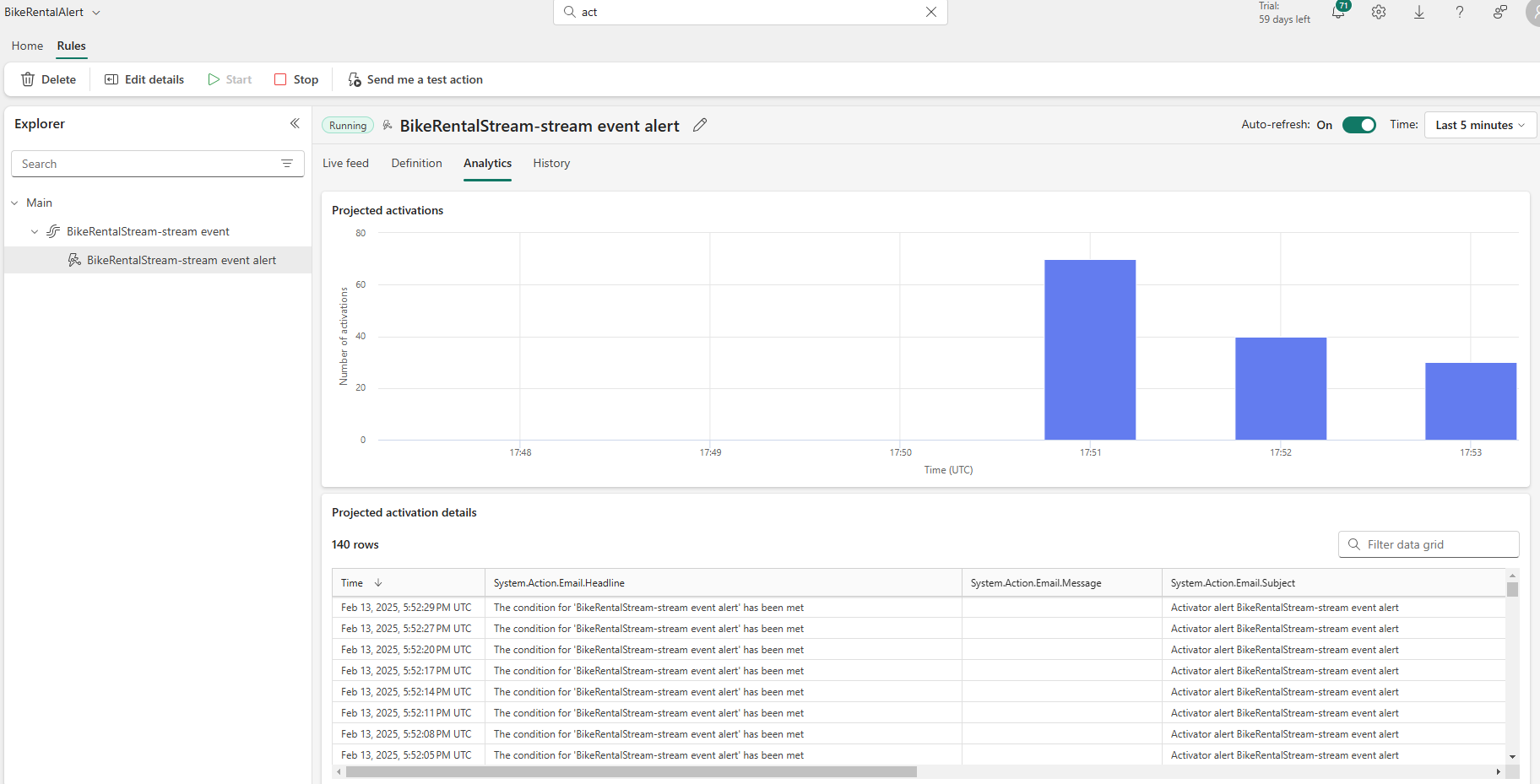
_Example Alert for BikeRental_
Step 6: Integration with Git and Deployment Pipelines
- Take advantage of the new GitHub integration for version control.
- Set up deployment pipelines to manage the lifecycle of your data assets.
Step 7: Test and Monitor
- Use the new workspace monitoring feature to track the performance of your data production line.
- Take advantage of Fabric Runtime 1.3, which includes Apache Spark 3.5 and other updates, to optimize processing.
Use Cases and Real-World Applications
- IoT monitoring: Real-time analysis of industrial sensor data for predictive maintenance.
- Bank transaction analysis: Instant processing of transactions to detect suspicious patterns.
- Fraud detection: Immediate identification of anomalous activity in payment systems.
- Content personalization: Real-time adjustment of recommendations based on user behavior.
Conclusion: The Factory Floor of the Future
With these updates, your data factory is more powerful than ever. Microsoft Fabric keeps evolving, offering increasingly robust tools for handling real-time data.
Key takeaways
- Streaming in Fabric delivers real-time data processing with minimal latency.
- The platform unifies several analytics tools, simplifying the workflow.
- Event Streams enable no-code transformations and flexible data routing.
- Seamless integration with Power BI for real-time visualizations.
Advantages of Streaming in Microsoft Fabric
- Real-time insights for fast decision-making
- Scalability to handle large volumes of data
- Flexibility to connect many data sources and destinations
- Less complexity with a unified platform
Next steps for getting started
- Get familiar with Fabric’s components, especially Event Streams and OneLake.
- Identify use cases in your organization that would benefit from real-time analytics.
- Try building a simple event stream using Fabric’s no-code tools.
- Explore integrations with other tools you already use, such as Azure or Kafka.
Remember: in the real-time data factory, innovation never stops. Keep learning and experimenting with the new features to keep your knowledge production at the cutting edge of technology!